
CVE-2026-76605: Fabrik Joomla Extension Remote Code Execution Bug - What It Means for Your Business and How to Respond
CVE-2026-76605 is a critical vulnerability in the Fabrik extension for Joomla that can allow an unauthenticated attacker to run malicious code on a vulnerable web server. Because Fabrik is commonly used to build forms, directories, and data-driven applications, any organization operating a public Joomla website with this extension should treat the issue as urgent. This post explains the business impact, helps you determine whether your organization is exposed, and provides practical response steps for both business leaders and technical teams.
Background & History
CVE-2026-76605 was published on August 22, 2026 and concerns the Fabrik extension for Joomla, distributed by fabrikar.com. The vulnerability is a remote code execution flaw in Fabrik’s image element functionality, affecting versions before 4.7.2 according to the CVE description; some vulnerability databases also identify releases through 4.7.3 as affected.
The issue carries a CVSS v3.1 base score of 9.8 and a CVSS v4.0 base score of 10.0, both classified as critical. It is categorized as improper control of code generation, commonly described as code injection, and can be reached over a network without valid credentials or user interaction.
The key response milestone is the vendor’s security update: organizations should move to a fixed Fabrik release as soon as one is available through the official Fabrik distribution channel. Public tracking of the CVE was updated on October 12, 2026, and security teams should continue monitoring the vendor’s advisories for confirmation of the exact fixed version and any additional guidance.
What This Means for Your Business
If your public website runs Joomla with a vulnerable version of Fabrik, an attacker may be able to take control of the underlying web server without logging in. That can turn a marketing site, customer portal, donation page, or internal business application into an entry point for broader systems compromise.
The immediate operational risk is website disruption. An attacker could alter pages, remove content, inject malicious redirects, or take the site offline, interrupting customer communication, lead generation, online sales, and staff workflows.
The data risk can be more serious. Once code execution is achieved, attackers may access customer records, form submissions, payment-related metadata, internal documents, credentials stored on the server, or connections to backend business systems. Even if sensitive data is not stored directly on the website, the compromised server may provide a path to it.
There are also reputational and compliance consequences. A compromised site can be used to distribute malware or phishing content, damaging customer trust and potentially triggering search-engine warnings. Organizations subject to privacy, financial, healthcare, or contractual security obligations may need to assess whether the incident constitutes a reportable data breach.
Real-World Examples
Regional financial services firm: A regional bank uses a Joomla-based customer education site with Fabrik forms for appointment requests and document inquiries. A successful exploit could expose inquiry data and allow attackers to place convincing phishing content on a trusted domain, undermining customer confidence and creating regulatory notification obligations.
Mid-sized healthcare provider: A clinic operates a public Joomla site for service information, patient resources, and contact forms. If the site shares infrastructure with scheduling or patient-communication systems, server compromise could expose operational data and disrupt appointment-related communications.
Professional services organization: A consulting firm uses Fabrik to manage proposal requests, event registrations, and resource downloads. An attacker could alter downloadable materials, capture prospect information, or use the server to launch attacks against clients, creating legal and reputational exposure beyond the firm’s own environment.
Small e-commerce business: A growing online retailer uses Joomla for content marketing and product inquiries. Compromise could result in malicious redirects during peak sales periods, lost orders, fraudulent customer communications, and costly emergency incident response.
Am I Affected?
- You are running the Fabrik extension for Joomla from fabrikar.com on a public or internal website.
- You are running Fabrik version 4.7.1 or earlier, which is within the range described as vulnerable in the CVE record.
- You are running a version identified by your vulnerability scanner or vendor advisory as affected, including versions up to 4.7.3 where applicable.
- You cannot immediately confirm the installed Fabrik version through Joomla’s extension manager, package metadata, or asset inventory.
- Your Joomla site exposes Fabrik forms, lists, or image element functionality to untrusted internet users.
- Your website is hosted on shared infrastructure that also contains sensitive business systems, customer data, or administrative credentials.
- You have not yet applied the latest vendor-supplied Fabrik update or confirmed with the vendor that your installed release is fixed.
Key Takeaways
- CVE-2026-76605 is a critical remote code execution vulnerability in the Fabrik extension for Joomla.
- An unauthenticated attacker may be able to exploit the flaw over the internet without user interaction.
- The potential impact includes website takeover, data exposure, service disruption, malware distribution, and compliance obligations.
- Any organization using Fabrik should inventory its Joomla sites and determine the exact extension version without delay.
- The primary remedy is to apply the official vendor update; interim controls should restrict exposure until patching is complete.
Call to Action
If your organization operates Joomla websites, do not wait for a security alert to confirm whether Fabrik is present and vulnerable. IntegSec can help you identify exposed web applications, validate the risk, test your defenses, and prioritize remediation based on real business impact. Visit https://integsec.com to schedule a penetration test and strengthen your organization’s cybersecurity posture.
Technical Appendix
A — Technical Analysis
CVE-2026-76605 is a remote code execution vulnerability caused by improper control of generation of code, classified as CWE-94, in the image element component of the Fabrik extension for Joomla. The vulnerable component is associated with com_fabrik, and the issue arises from inadequate validation or handling of image element input, permitting attacker-controlled code execution on the server.
The published CVSS v4.0 vector is CVSS:4.0/AV:N/AC:L/AT:N/PR:N/UI:N/VC:H/VI:H/VA:H/SC:H/SI:H/SA:H. This indicates a network attack vector, low attack complexity, no attack requirements, no privileges required, and no user interaction, with high confidentiality, integrity, and availability impact on both the vulnerable system and subsequent systems.
The corresponding CVSS v3.1 vector is CVSS:3.1/AV:N/AC:L/PR:N/UI:N/S:U/C:H/I:H/A:H, with a base score of 9.8. The MITRE and NVD record identifies the affected product as the Fabrik Joomla extension and describes exploitation through the image element in versions before 4.7.2.
B — Detection & Verification
Version enumeration: Administrators should identify Fabrik installations through Joomla’s administrative extension manager, installed-package metadata, and filesystem inspection. The following commands can help locate the extension and version indicators on a Joomla host.
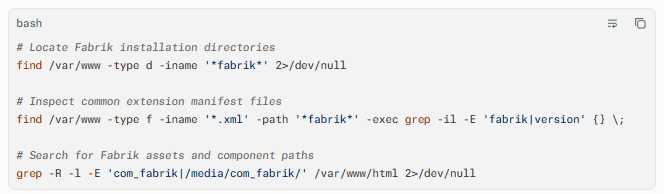
Scanner signatures: Vulnerability scanners should test for the presence of /components/com_fabrik/ and /media/com_fabrik/, then correlate the discovered Fabrik version with CVE-2026-76605. Scanner plugins should flag any release identified as vulnerable by the vendor advisory or CVE record, with priority given to internet-facing Joomla hosts.
Log indicators: Review web server, application, and web application firewall logs for unexpected requests targeting Fabrik endpoints, image element parameters, or com_fabrik routes. Look for unusual POST requests, unexpected file extensions, encoded payloads, or requests originating from unfamiliar IP addresses.
Behavioral anomalies: Investigate new administrative users, modified Joomla templates or plugins, unexpected PHP files, outbound connections from the web server, altered scheduled tasks, and changes to web root files. These behaviors may indicate post-exploitation activity following successful code execution.
Network exploitation indicators: Monitor for anomalous outbound traffic from Joomla hosts, particularly connections to unfamiliar command-and-control infrastructure, unusual DNS queries, or unexpected data transfers. Network detection should focus on compromised-server behavior rather than assuming exploitation is limited to a single HTTP request.
C — Mitigation & Remediation
- Immediate (0–24h): Inventory all Joomla installations and identify every instance of the Fabrik extension. Determine the installed version, classify internet-facing systems as highest priority, and apply the official vendor update to a fixed release as soon as it is available.
- Short-term (1–7d): For systems that cannot be patched immediately, restrict public access to Fabrik functionality, especially image element endpoints and
com_fabrikfront-end routes. Use web application firewall rules, web server access controls, or temporary removal of the extension where business operations allow. Review logs for exploitation attempts and preserve evidence for incident response. - Long-term (ongoing): Establish routine third-party extension inventory and patch management for Joomla and all installed plugins. Require vulnerability scanning of public web applications, enforce least privilege for web server and database accounts, separate content management systems from sensitive backend systems, and validate remediation through targeted penetration testing.
The official vendor patch should always take precedence over compensating controls. Interim mitigations reduce exposure but do not correct the underlying code injection weakness, so they should be treated as temporary risk reduction rather than a complete fix.
D — Best Practices
- Maintain a complete inventory of CMS platforms, extensions, versions, and internet-facing endpoints.
- Patch third-party web application components promptly, with priority for unauthenticated remote code execution vulnerabilities.
- Restrict administrative interfaces and sensitive application functionality through network controls, authentication, and least-privilege access.
- Monitor web application logs for anomalous requests, unexpected file creation, and post-exploitation behavior.
- Validate remediation with vulnerability scanning and periodic penetration testing focused on web applications and CMS extensions
Leave Comment