
CVE-2026-59568: Zscaler Client Connector Remote Code Execution - What It Means for Your Business and How to Respond
Introduction
CVE-2026-59568 matters because it affects Zscaler Client Connector, the endpoint software many organizations rely on to connect employees to protected corporate resources. A successful attack could allow an unauthenticated remote attacker to run malicious code in the context of the Client Connector application, potentially turning a security control into a foothold for wider compromise.
Any organization using affected versions of Zscaler Client Connector on Windows, macOS, Linux, Android, ChromeOS, or iOS should treat this as a priority. That includes enterprises with hybrid workforces, managed devices, contractors, and branch offices, as well as smaller businesses that depend on Zscaler for secure remote access.
This post explains what the vulnerability means in business terms, who is exposed, and how to respond. It also includes a technical appendix for security engineers, penetration testers, and IT teams responsible for detection, verification, and remediation.
Background & History
Zscaler published the advisory for CVE-2026-59568 on August 24, 2026, and the National Vulnerability Database listed the record the same day, with a subsequent update on August 28, 2026. The vulnerability affects multiple versions of Zscaler Client Connector across major desktop and mobile platforms.
The issue is a collection of improper input validation weaknesses that can lead to remote code execution. In plain language, the software fails to sufficiently check data it receives, allowing an attacker to send specially crafted input that causes the application to execute attacker-controlled code.
Zscaler assigned the vulnerability a CVSS v3.1 base score of 9.1 out of 10, classifying it as critical. The score reflects network exploitation, low attack complexity, no required privileges, no user interaction, and high confidentiality and integrity impact. The advisory does not publicly identify an external reporter in the available CVE and NVD records; Zscaler is listed as the CVE Numbering Authority.
What This Means for Your Business
If your organization uses an affected Client Connector version, the immediate business risk is loss of control over endpoint security. Zscaler Client Connector is often deployed on laptops, mobile devices, and shared systems to enforce secure access. An attacker who can execute code in its context may be able to interfere with the very mechanism intended to protect connectivity and access decisions.
Operational impact could include disrupted access to business applications, forced device isolation, incident response costs, and lost productivity while teams investigate and remediate affected endpoints. Because the flaw can be exploited without valid credentials or user interaction, exposure is not limited to employees who click malicious links or enter passwords.
Data risk is also significant. The CVSS vector indicates high confidentiality and integrity impact, meaning an attacker could potentially access sensitive information or alter the behavior of the affected component. For organizations handling customer records, payment data, health information, intellectual property, or regulated financial data, this creates a direct compliance concern.
Reputational harm can follow quickly if attackers use vulnerable endpoints to access customer data or disrupt services. Regulators, customers, and partners increasingly expect organizations to demonstrate timely patching, asset visibility, and evidence of incident response. A critical vulnerability in widely deployed security software is exactly the type of issue that can trigger those expectations.
Real-World Examples
Regional financial services firm: A regional bank deploys Client Connector to remote employees and branch staff. If unpatched endpoints are reachable from an untrusted network, an attacker could attempt code execution on a corporate laptop and use that access to move toward internal banking systems, creating regulatory and customer-trust exposure.
Mid-sized healthcare provider: A healthcare organization uses managed laptops for clinicians and administrative staff. A compromised endpoint could expose patient scheduling systems, electronic records, or business email, potentially triggering breach notification obligations and disrupting patient care operations.
SaaS company with distributed teams: A software company relies on remote engineers and contractors using company-managed devices. An attacker who compromises a developer workstation could seek source code, cloud credentials, or deployment pipelines, turning one endpoint issue into a supply chain and intellectual property risk.
Professional services firm: A small accounting or legal firm uses Client Connector on employee laptops to reach client portals and document repositories. Even without a large IT team, a successful compromise could expose confidential client files and interrupt billable work during remediation.
Am I Affected?
- You are running Zscaler Client Connector on Windows at or below version 4.6.0.457, 4.7.0.317, 4.8.0.232, or 4.9.0.372 in the applicable release branch.
- You are running affected macOS versions at or below 4.5.2.312, 4.7.0.292, or 4.8.0.191.
- You are running affected Linux versions at or below 3.7.2.64 or 4.2.1.64.
- You are running Client Connector 4.2 or earlier on Android or ChromeOS.
- You are running affected iOS versions at or below 4.5.1.
- You allow employees, contractors, or partners to connect from untrusted networks using vulnerable Client Connector installations.
- You do not currently have centralized visibility into Client Connector versions across all managed and unmanaged endpoints.
- You have not confirmed that every endpoint has been updated to a Zscaler release that addresses CVE-2026-59568.
Key Takeaways
- CVE-2026-59568 is a critical remote code execution vulnerability in affected versions of Zscaler Client Connector.
- It can be exploited over a network without valid credentials or user interaction, increasing exposure for remote and hybrid workforces.
- The potential business impact includes operational disruption, sensitive data exposure, compliance obligations, and reputational damage.
- Organizations should inventory every device running Client Connector and prioritize updates to vendor-fixed releases.
- Detection, patch verification, and endpoint monitoring should be treated as immediate actions, not deferred maintenance.
Call to Action
If you are unsure whether your organization is exposed, do not wait for an attacker to answer that question. IntegSec can help you validate endpoint exposure, test the effectiveness of your controls, and prioritize remediation based on real business risk. Visit https://integsec.com to schedule a penetration test and strengthen your cybersecurity posture with practical, evidence-based risk reduction.
Technical Appendix
A — Technical Analysis
CVE-2026-59568 comprises multiple vulnerabilities in Zscaler Client Connector caused by improper input validation, classified as CWE-20. The weaknesses permit an unauthenticated, unprivileged remote actor to execute arbitrary code within the ZCC process context.
The attack vector is network-based, with low attack complexity, no privileges required, and no user interaction required. The CVSS v3.1 vector is CVSS:3.1/AV:N/AC:L/PR:N/UI:N/S:U/C:H/I:H/A:N, producing a base score of 9.1. The scope is unchanged, confidentiality and integrity impacts are high, and availability impact is none.
Affected product families include Client Connector for Windows, macOS, Linux, Android, ChromeOS, and iOS. The NVD record identifies Zscaler as the CNA and links to the vendor release summary for remediation details. Public records do not provide a proof-of-concept or detailed exploitation procedure, so defenders should rely on vendor guidance and controlled validation rather than assumptions about exploitability.
B — Detection & Verification
Version enumeration commands:
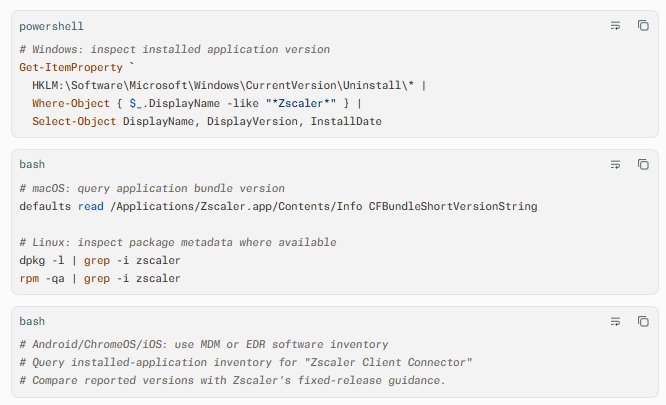
Scanner signatures: Use vulnerability scanners with current plugin and audit content for CVE-2026-59568. Tenable lists the CVE as critical and provides plugin coverage through its vulnerability management platform; ensure scanner definitions are updated before assessment.
Log indicators: Review ZCC service logs, endpoint telemetry, and EDR alerts for unexpected Child Process creation from the Client Connector process, abnormal network connections originating from ZCC, crashes or restart loops, and unexpected changes to Client Connector configuration.
Behavioral anomalies: Look for ZCC spawning interpreters, command shells, scripting hosts, or credential-access tools. Investigate devices where the Client Connector process communicates with unfamiliar destinations or exhibits unusual persistence behavior.
Network exploitation indicators: Monitor for unexpected inbound or peer-to-peer network sessions involving endpoints running vulnerable ZCC versions, particularly from untrusted networks. Because the flaw is network-exploitable without authentication, network telemetry should be correlated with endpoint process activity rather than relied upon alone.
C — Mitigation & Remediation
- Immediate (0–24h): Inventory all endpoints running Zscaler Client Connector and identify versions against Zscaler's affected-version list. Deploy the official vendor update to all affected Windows, macOS, Linux, Android, ChromeOS, and iOS devices as the primary remediation.
- Short-term (1–7d): For endpoints that cannot be patched immediately, restrict network exposure, require VPN or trusted-network access where operationally feasible, and isolate high-risk devices through EDR containment. Increase monitoring on ZCC process activity and review authentication and access logs for signs of compromise. Validate patch deployment through MDM, EDR, and vulnerability scanner evidence rather than assuming update success.
- Long-term (ongoing): Establish a patch SLA for critical endpoint security software, maintain an accurate software inventory across all operating systems, and include third-party agent update validation in routine vulnerability management. Add Client Connector process behavior, version drift, and unexpected network activity to detection engineering and penetration test scopes.
Interim mitigations: If patching is delayed, reduce exposure by limiting remote access to managed devices, enforcing conditional access policies, segmenting sensitive systems, and temporarily blocking vulnerable Client Connector versions from accessing high-value resources. These controls reduce risk but do not replace the vendor patch.
D — Best Practices
- Maintain a continuously updated inventory of endpoint agents, including version, operating system, owner, and network exposure.
- Prioritize patches for security software and agents that hold privileged access or influence network access decisions.
- Validate remediation with independent evidence from MDM, EDR, and vulnerability scanning rather than deployment reports alone.
- Monitor security-agent process behavior for anomalous child processes, network connections, and configuration changes.
- Include endpoint agent compromise scenarios in penetration tests, tabletop exercises, and incident response playbooks
Leave Comment