
CVE-2026-56705: Adminer Remote Code Execution Bug - What It Means for Your Business and How to Respond
Introduction
CVE-2026-56705 is a critical security flaw in Adminer, a widely used database management tool. If your organization runs an outdated, internet-facing Adminer instance, an attacker may be able to take control of the underlying web server without a password or user interaction.
This matters because a successful attack can expose customer records, financial data, internal credentials, and the systems connected to your database environment. It can also disrupt operations and create regulatory and contractual exposure for organizations in the United States and Canada.
This post explains the vulnerability in business terms, identifies who is at risk, provides practical scenarios, and gives security teams a clear detection and remediation path. The technical appendix is intended for IT, security engineering, and penetration testing teams.
Background & History
CVE-2026-56705 was published on August 25, 2026 and affects Adminer versions before 5.4.3. The issue was tracked through a GitHub security advisory and documented by VulnCheck, with the National Vulnerability Database listing the vendor as vrana and the affected product as Adminer.
The vulnerability is classified as External Control of File Name or Path, mapped to CWE-73. In plain language, Adminer accepts information used to build a database connection and does not properly restrict it. An attacker can manipulate that information to influence where files are written on the server.
The flaw carries a CVSS v4.0 base score of 9.3 and a CVSS v3.1 base score of 9.8, both rated critical. Adminer 5.4.3 is the fixed release, making prompt upgrading the primary response.
What This Means for Your Business
If your business uses Adminer to manage databases, this vulnerability can turn a routine administrative tool into an entry point for a serious compromise. Because exploitation does not require a valid account or an employee mistake, an exposed instance can be attacked directly from the internet.
The most immediate risk is loss of control over the server running Adminer. An attacker who gains code execution may access databases, steal credentials, alter records, deploy additional malware, or move into connected applications and infrastructure. For a business, that can mean interrupted sales systems, corrupted operational data, and costly emergency response work.
Data exposure creates a second layer of risk. Customer information, employee records, payment-related data, intellectual property, and business communications may all be reachable from a compromised database server. Depending on the data involved, this can trigger breach-notification obligations, customer notifications, forensic investigations, and scrutiny from regulators or business partners.
Reputation and trust are also at stake. Customers and partners expect reasonable protection around systems that hold their information. A preventable compromise of an administrative tool can damage confidence, complicate sales and procurement conversations, and increase the cost of winning or retaining business.
Finally, the flaw is especially important for small and mid-sized organizations. Adminer is often deployed because it is lightweight and convenient, but convenience tools can be forgotten after initial setup. If your team cannot immediately confirm where Adminer is running, who can reach it, and what version it uses, treat that uncertainty as a security risk.
Real-World Examples
Regional financial services firm: A regional bank uses Adminer on an internal administration server that is unintentionally reachable through a misconfigured firewall rule. An attacker exploits the flaw, gains access to the server, and queries customer account records. The bank must contain the incident, notify affected customers, and demonstrate to regulators that it understands the scope of access.
Mid-sized healthcare provider: A healthcare organization runs Adminer alongside a patient scheduling application. Because the database contains protected health information, a successful compromise could expose appointment details, patient identifiers, and clinical notes. Beyond notification costs, the organization could face operational disruption and loss of patient trust.
E-commerce company: An online retailer uses Adminer during development and leaves it enabled on a production server. An attacker gains code execution, extracts customer email addresses and order histories, and attempts to access payment-related systems. Even if payment data remains protected, the company may face fraud monitoring, customer support strain, and reputational harm.
Professional services firm: A small accounting or consulting firm uses Adminer on a cloud server to manage client project databases. An attacker compromises the server and uses stored credentials to reach connected business applications. The firm faces client notification requirements, potential contract disputes, and the expense of rebuilding trust after a preventable exposure.
Am I Affected?
- You are running Adminer version 5.4.2 or earlier.
- You are unsure which Adminer version is deployed across production, staging, development, or contractor-managed systems.
- Adminer is reachable from the internet, a partner network, a VPN, or a broad internal network segment.
- Your web server allows PHP file execution in a directory where Adminer can influence file creation.
- You use Microsoft SQL Server or an ODBC-based database connection path through Adminer.
- You have no centralized inventory showing where database administration tools are installed.
- You rely on a hosting provider, managed service provider, or development team without confirming whether they deploy Adminer.
- You have not yet applied the Adminer 5.4.3 security update.
Key Takeaways
- CVE-2026-56705 is a critical, remotely exploitable vulnerability in Adminer versions before 5.4.3.
- An attacker does not need a valid user account or employee interaction to attempt exploitation.
- A successful attack can lead to server takeover, database access, data theft, and further compromise of connected systems.
- Businesses face operational, legal, reputational, and compliance consequences when sensitive data or production systems are exposed.
- The first priority is to locate every Adminer deployment, remove unnecessary internet access, and upgrade to version 5.4.3 or later.
Call to Action
If you cannot confidently answer where Adminer is running, who can reach it, and whether it is patched, now is the time to act. IntegSec helps organizations identify exposed administrative tools, validate exploitation risk, and reduce the likelihood of a serious breach through focused penetration testing and practical security guidance. Visit https://integsec.com to speak with our team about assessing your environment and strengthening your defenses.
Technical Appendix
A — Technical Analysis
CVE-2026-56705 arises because Adminer versions before 5.4.3 fail to sanitize the server field before using it to construct a PDO Data Source Name (DSN) string. An unauthenticated attacker can inject ODBC parameters through semicolons in that field.
By injecting the TraceFile and TraceOn ODBC parameters, an attacker can direct trace output to a controlled path. In a vulnerable configuration, this can result in PHP code being written into the web root. When the written trace file is subsequently accessed through the web server, the PHP interpreter executes it, resulting in remote code execution.
The attack vector is network-based, with low attack complexity, no required privileges, and no user interaction. The CVSS v4.0 vector is CVSS:4.0/AV:N/AC:L/AT:N/PR:N/UI:N/VC:H/VI:H/VA:H/SC:N/SI:N/SA:N, producing a CVSS-B score of 9.3. The CVSS v3.1 vector is CVSS:3.1/AV:N/AC:L/PR:N/UI:N/S:U/C:H/I:H/A:H, producing a 9.8 critical score.
The weakness is enumerated as CWE-73, External Control of File Name or Path. The affected component is Adminer’s handling of the server field when constructing a PDO DSN, particularly in an MSSQL/ODBC connection context. The official vendor fix is Adminer 5.4.3.
B — Detection & Verification
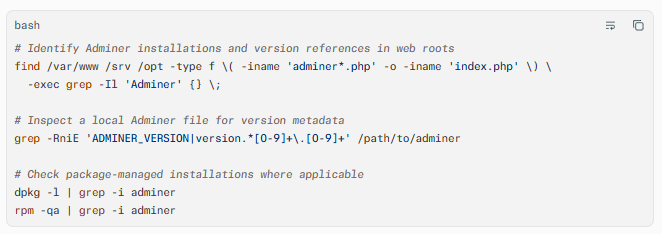
Version enumeration commands:
Scanner signatures:
- Configure authenticated and unauthenticated web scans to detect Adminer login pages, common filenames such as
adminer.php, and version strings. - Use a vulnerability scanner check for CVE-2026-56705 where available, and verify scanner findings manually before remediation decisions.
- Test non-production instances first, because exploitation can create files and alter server state.
Log indicators:
- Review web access logs for unusual requests containing semicolons,
TraceFile,TraceOn, or ODBC-related parameter text in theserverfield. - Search for requests to newly created PHP files in web-accessible directories, especially files with unfamiliar names or recent creation timestamps.
- Review PHP-FPM, Apache, Nginx, and application error logs for database connection failures immediately followed by file-write or web-request activity.
Behavioral anomalies:
- Unexpected PHP files appearing in the web root.
- New outbound connections from the web server, particularly to unfamiliar IP addresses.
- Database queries, credential access, or file reads that do not align with normal administrative activity.
- Sudden creation of scheduled tasks, webshells, or persistence mechanisms after Adminer access attempts.
Network exploitation indicators:
- Inbound HTTP requests to Adminer endpoints from unknown external sources.
- Repeated POST requests to Adminer login or connection pages containing suspicious
serverparameter values. - Follow-up GET requests to newly created
.phpfiles, which may indicate execution of an attacker-written trace file.
C — Mitigation & Remediation
- Immediate (0–24 hours): Identify exposure and remove public access.
Inventory all Adminer installations across production, staging, development, backup, and third-party-managed environments. Restrict access to trusted administrative networks, VPN users, or bastion hosts. If the tool is not required, disable or remove it immediately. Preserve relevant logs before making broad changes. - Short-term (1–7 days): Apply the vendor patch and validate the environment.
Upgrade every required Adminer deployment to version 5.4.3 or later, following the vendor’s official release and security advisory. After patching, verify the running version, test database connectivity, and review the web root for unexpected PHP files. Rotate database credentials, application secrets, and any credentials that may have been exposed through a compromised Adminer instance. - Long-term (ongoing): Reduce administrative attack surface.
Keep database administration tools off the public internet and behind strong identity controls, multifactor authentication, and network segmentation. Maintain an asset inventory that includes administrative utilities, enforce patch SLAs for internet-facing software, and monitor web roots for unauthorized file creation. Include Adminer and similar tools in regular penetration tests and external attack-surface reviews.
Interim mitigations when patching is not immediately possible:
- Remove Adminer from internet-facing systems or block all untrusted access at the firewall, reverse proxy, or cloud security-group level.
- Restrict access by source IP, corporate VPN, or an authenticated administrative gateway.
- Disable PHP execution in directories where Adminer could write files, where operationally feasible.
- Enable detailed web and PHP logging, and alert on requests containing
TraceFile,TraceOn, semicolon-richservervalues, or access to newly created PHP files. - Isolate the Adminer host from sensitive database segments and monitor east-west traffic for unexpected access.
D — Best Practices
- Maintain a complete inventory of database administration tools, including versions, owners, network exposure, and business justification.
- Never expose administrative interfaces such as Adminer directly to the public internet.
- Apply security updates promptly, prioritizing critical vulnerabilities in internet-facing software.
- Enforce least privilege for database accounts and separate administrative credentials from application credentials.
- Monitor web roots, web server logs, and database access patterns for unauthorized file creation and anomalous queries.
- Include administrative tools in routine external attack-surface assessments and penetration tests
Leave Comment