
CVE-2026-5388: justhtml Sanitization Bypass - What It Means for Your Business and How to Respond
Introduction
CVE-2026-5388 matters because it undermines a security control many organizations rely on to make user-generated web content safe. If your website, customer portal, support platform, or internal application uses the justhtml library to clean comments, profiles, tickets, Markdown content, or other untrusted input, an attacker may be able to bypass that cleaning process and inject active web content.
The issue is especially important for businesses across the United States and Canada that accept public submissions, operate customer-facing portals, or embed content from partners and vendors. A successful attack can affect customer trust, disrupt operations, expose sensitive information, and create regulatory exposure.
This post explains who is at risk, what the vulnerability means in business terms, how to determine whether your organization is affected, and the practical steps to reduce risk. A technical appendix provides detection, verification, and remediation guidance for security engineers and IT teams.
Background & History
CVE-2026-5388 was published on August 23, 2026 and affects justhtml versions before 1.15.0. The issue was credited to Emil Stenstrom, the project maintainer, after security fixes in justhtml 1.14.0 were identified with the assistance of an AI model.
The vulnerability is a collection of sanitization weaknesses rather than one simple coding mistake. In plain language, justhtml is supposed to remove or neutralize dangerous content before a browser displays it. Depending on how an application uses the library, attackers may be able to slip active HTML or JavaScript past those protections.
VulnCheck assigned the issue a CVSS 4.0 base score of 9.3, classified as Critical. The affected product is the justhtml Python package, and version 1.15.0, released on April 9, 2026, contains the fixes.
What This Means for Your Business
For a business, the central risk is that a trusted-looking web page can be turned into an attack tool. If an attacker injects malicious script into a comment, support ticket, product review, profile, or document preview, that content may execute when an employee or customer views it.
The immediate operational risk is account compromise. An attacker could potentially steal session information, redirect users to fraudulent pages, capture credentials, or perform actions while impersonating a legitimate user. For a customer portal, that can mean unauthorized access to orders, messages, invoices, or support histories.
The data risk depends on what the affected application can access. Even if the vulnerability does not directly expose a database, attackers may use a compromised browser session to reach customer records, internal workflows, or administrative functions. That can turn a website flaw into a broader data-protection incident.
Reputational harm can be significant. Customers may lose confidence after seeing suspicious redirects, fraudulent content, or evidence that their accounts were accessed. In the United States and Canada, organizations may also face notification, investigation, and contractual obligations if customer personal information is affected.
The most important point is that this is not only a developer problem. Any business that relies on a web application to safely display content from customers, vendors, employees, or third-party systems should treat this as a priority risk.
Real-World Examples
Regional Bank Customer Support Portal: A regional bank uses justhtml to sanitize messages submitted through its secure support center. An attacker submits a crafted support request that bypasses sanitization. When a service representative opens the ticket, malicious script attempts to capture the representative’s session and access customer account details.
Mid-Sized Healthcare Provider Portal: A healthcare provider allows patients to submit appointment notes and feedback through a patient portal. A successful injection could redirect patients to a fake login page or manipulate displayed information. Beyond operational disruption, this could complicate privacy obligations and patient trust.
E-Commerce Retailer Review System: An online retailer displays customer reviews and questions on product pages. An attacker plants malicious content in a review that executes when shoppers view the page. The business may face fraudulent orders, stolen customer sessions, payment-page redirection, and damage to its brand during a high-sales period.
Professional Services Firm Knowledge Base: A consulting firm uses a Markdown-based internal knowledge base that permits HTML passthrough. An employee or compromised partner account submits content containing a bypass payload. When colleagues view the document, the attacker may attempt to steal internal credentials or move deeper into the firm’s systems.
Am I Affected?
- You are running justhtml version 1.14.0 or earlier in any application, service, container image, or dependency environment.
- You use justhtml helper functions such as
clean_url_valueorclean_url_in_js_stringto process URLs from users, partners, or third-party systems. - Your application builds HTML elements, attributes, or comments programmatically using values influenced by user input.
- You use Markdown rendering with
html_passthrough=True, especially for comments, tickets, documentation, or AI-generated content. - You use custom sanitization policies or transform pipelines that preserve
<style>,<meta http-equiv="refresh">,<base href>,ping,attributionsrc, orimagesrcset. - You are unsure whether justhtml is present because it may be installed as a transitive dependency rather than listed directly in your main application requirements.
- You do not use justhtml, directly or indirectly; in that case, this specific CVE does not apply, though similar sanitization risks may still warrant review.
Key Takeaways
- CVE-2026-5388 affects justhtml versions before 1.15.0 and can allow attackers to bypass HTML and URL sanitization controls.
- Businesses that display customer, employee, partner, or third-party content through affected applications face account-compromise, data-exposure, and reputational risks.
- Exposure is often indirect, so teams should check application dependencies, containers, and build environments rather than only top-level software lists.
- The vendor fix is justhtml 1.15.0; organizations that cannot patch immediately should disable risky configurations and apply compensating controls.
- Prompt inventory, patching, log review, and validation through security testing are the most effective way to reduce business impact.
Call to Action
If your organization operates customer-facing applications, internal portals, or platforms that process untrusted content, do not wait for a security incident to confirm your exposure. IntegSec can help you identify vulnerable dependencies, validate exploitability, review sanitization controls, and prioritize remediation based on real business risk. Visit https://integsec.com to discuss a penetration test and a practical path to deeper cybersecurity risk reduction.
Technical Appendix
A — Technical Analysis
CVE-2026-5388 affects the justhtml Python HTML-sanitization library in versions prior to 1.15.0. The root cause is improper input validation across several components: the clean_url_value and clean_url_in_js_string URL helpers, HTML serialization of programmatically constructed nodes, Markdown passthrough when html_passthrough=True, and certain custom policy or transform configurations.
The attack vector is network-based. An attacker can submit crafted content to an endpoint that later renders it through a vulnerable justhtml configuration. Attack complexity is low, no privileges are required, and no user interaction beyond viewing the affected rendered content is required. The CNA vector is CVSS:4.0/AV:N/AC:L/AT:N/PR:N/UI:N/VC:H/VI:H/VA:H/SA:N/SC:N/SI:N/SA:N; NVD lists the CVSS-B score as 9.3 Critical.
Documented bypass families include encoded javascript: URLs, backslash-based relative URLs that browsers may resolve as remote hosts, markup-breaking element or attribute names, HTML comment breakouts, raw </textarea> reintroduction through Markdown passthrough, and preserved dangerous tags or URL-bearing attributes in custom policies. The NVD reference is https://nvd.nist.gov/vuln/detail/CVE-2026-5388. NVD enumerates CWE-20, Improper Input Validation; the upstream advisory also maps related issues to CWE-79, CWE-178, and CWE-755.
B — Detection & Verification
Version enumeration commands:
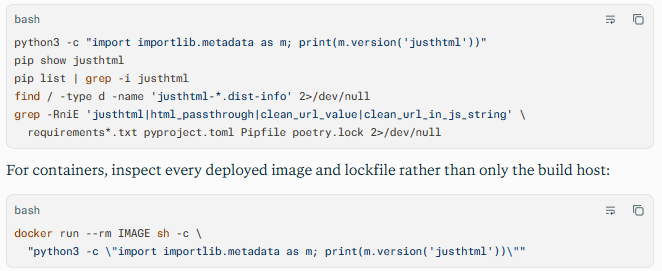
Scanner signatures: Configure dependency scanners to flag justhtml >= 0, < 1.15.0 and reference CVE-2026-5388 or GHSA-c9vm-hv86-f23r. Static analysis should identify calls to the affected helper APIs, html_passthrough=True, custom policy definitions, and programmatic DOM construction using untrusted values.
Log indicators: Search web, application, reverse-proxy, and WAF logs for encoded or obfuscated JavaScript URL schemes, including javascript, jav	ascript, java%73cript, and javascript:. Also search request bodies and URLs for backslash-based host patterns such as \\evil.example or /\\evil.example, raw </textarea> sequences, and comment-breakout patterns such as <!--><script or --><svg.
Behavioral anomalies: Investigate stored user content containing unexpected <script>, <svg>, <iframe>, <meta http-equiv="refresh">, <base href>, or <style> elements. Review authentication logs for unusual session reuse, rapid privilege changes, unexpected redirects, and administrative actions following views of user-generated content.
Network exploitation indicators: Look for POST submissions to comment, review, ticket, profile, Markdown, preview, or document-render endpoints followed by suspicious outbound requests from victim browsers. A high volume of scanner-like payloads from one source, followed by victim requests to attacker-controlled domains, is a strong investigation signal.
C — Mitigation & Remediation
- Immediate (0–24h): Inventory and isolate exposure. Identify every direct and transitive use of justhtml, including virtual environments, containers, serverless deployments, and build artifacts. Flag deployments running versions below 1.15.0. Where feasible, temporarily disable or restrict features that accept and render untrusted Markdown or HTML, especially those using
html_passthrough=True. - Short-term (1–7d): Apply the official patch and harden configuration. Upgrade every affected environment to justhtml 1.15.0 or later, pin the fixed version in dependency manifests and lockfiles, rebuild container images, and redeploy. Until patching is complete, avoid
html_passthrough=Truefor untrusted content; do not preserve<style>,<meta http-equiv="refresh">, or<base href>in custom policies; and avoid passing untrusted programmatic element names, attribute names, or comment data into serializers. - Long-term (ongoing): Validate, monitor, and re-sanitize stored content. Re-process previously stored user-generated content with the fixed library where appropriate, because malicious payloads may already exist in databases. Add dependency scanning and CI gates that fail builds containing vulnerable justhtml versions. Deploy a restrictive Content Security Policy, retain WAF and application logs, monitor for bypass payload patterns, and validate fixes through targeted penetration testing.
D — Best Practices
- Treat sanitizers as security boundaries and test them with adversarial inputs, including encoded URLs, parser-differential payloads, and context-breaking markup.
- Keep third-party libraries current through automated dependency inventory, lockfile review, and continuous vulnerability scanning.
- Avoid HTML passthrough for untrusted Markdown unless there is a documented business need and additional output controls.
- Apply a strict Content Security Policy to limit the impact of any successful script injection.
- Re-sanitize or review stored user-generated content after sanitizer upgrades, since previously accepted payloads can remain dangerous.
- Include sanitization bypass scenarios in web application penetration tests, particularly for portals that display public or partner-supplied content
Leave Comment