
CVE-2026-4703: WS Form LITE PHP Object Injection Bug - What It Means for Your Business and How to Respond
Introduction
CVE-2026-4703 is a critical security issue affecting websites that use the WS Form LITE drag-and-drop form builder plugin on WordPress. If your organization relies on online contact forms, quote requests, event registrations, lead-generation forms, customer intake workflows, or similar public-facing web forms, this vulnerability deserves immediate attention.
The risk is not limited to the WordPress plugin in isolation. A vulnerable installation can become materially more dangerous when combined with other plugins or themes on the same site. That means your website’s overall software stack, not just one form plugin, determines the practical exposure.
For businesses in the United States and Canada, a compromised public website can disrupt marketing and sales operations, expose customer information, damage trust, and create reporting or contractual obligations. This post explains the business impact, helps you determine whether you may be affected, and provides an appendix for security and IT teams responsible for technical verification and remediation.
S1 — Background & History
CVE-2026-4703 was published by the National Vulnerability Database on August 22, 2026. It affects WS Form LITE, a WordPress plugin marketed as a drag-and-drop contact form builder, in all versions through 1.10.80. The issue was reported through Wordfence, which is also the CVE Numbering Authority source for the published vulnerability record.
The vulnerability carries a Critical severity rating with a CVSS 3.1 score of 9.8 out of 10 from the reporting source. In plain language, it can allow an unauthenticated internet user to submit specially constructed information through a vulnerable form and cause the website to handle it in an unsafe way. No account, employee access, or customer interaction is required.
The National Vulnerability Database record was last modified on August 24, 2026 and is marked as not scheduled for further NVD enrichment at this time. Importantly, the published record states that WS Form LITE itself has no known usable object chain, but risk can increase substantially if another installed plugin or theme provides one.
S2 — What This Means for Your Business
For your business, CVE-2026-4703 is primarily a website and digital-risk management issue. A public form is often designed to make it easy for customers, prospects, suppliers, applicants, or patients to contact you. This vulnerability can turn that same accessibility into an entry point for an attacker if your WordPress environment is affected and contains compatible vulnerable code elsewhere.
A successful attack could lead to unauthorized changes to website content, deletion of files, exposure of sensitive information, or potentially code execution, depending on the other software installed on the website. That can interrupt online lead collection, e-commerce support, customer service, recruiting, campaign landing pages, and other revenue-facing functions.
The reputational consequences can outlast the technical incident. If visitors encounter malicious redirects, defaced pages, broken forms, or suspicious activity on your site, they may question whether your organization can safely handle their information. If forms collect personal, financial, health-related, or other sensitive information, you may also need to assess privacy, contractual, and breach-notification obligations under applicable U.S. state, Canadian federal, provincial, or industry-specific requirements.
You should not assume that a small website has a small risk. Attackers routinely scan the internet for exposed and unpatched software. Your best defense is rapid inventory, careful verification, patching when an official fixed version is available, and temporary controls when it is not.
S3 — Real-World Examples
A regional bank: A regional bank uses public website forms for mortgage inquiries, new-account questions, and branch appointment requests. If its WordPress site is affected, an incident could interrupt customer intake and require an urgent review of whether submitted personal information, website files, or public-facing content were exposed or altered. The bank could also face customer-confidence concerns during a period when digital trust directly affects account retention.
A mid-sized healthcare clinic: A clinic uses a WordPress form to request appointments and collect preliminary patient details. A compromise could take the form offline, disrupt appointment workflows, and create a significant privacy investigation if the site handled information that could identify patients. Even if the clinic’s clinical systems are separate, a compromised web presence can still harm operations and public confidence.
A Canadian professional-services firm: A law, accounting, engineering, or consulting firm may use web forms to receive inquiries, proposal requests, and document-upload instructions. An attacker who gains the ability to manipulate the site could redirect prospective clients, capture sensitive submissions, or damage the firm’s credibility at a critical point in the sales process.
An e-commerce retailer: A growing online retailer may use WS Form LITE for wholesale applications, returns, warranty claims, or promotional campaigns. An incident could disable lead collection, introduce unwanted content, interfere with customer communications, and increase support costs while staff investigate the website and restore trust.
S4 — Am I Affected?
- You are running WordPress and have WS Form LITE installed, including inactive copies left on the server or in a staging environment.
- You are running WS Form LITE version 1.10.80 or earlier. The published affected range includes all versions through 1.10.80.
- Your WS Form LITE forms accept submissions from the public internet, including contact, quote, registration, support, intake, or application forms.
- Your WordPress site uses multiple plugins or a custom theme, especially where your team has not recently reviewed the full plugin and theme inventory.
- You cannot confirm that a vendor-provided fixed release later than 1.10.80 has been installed. Public reporting indicates that no confirmed fixed release was identified at the time of its assessment.
- You use managed hosting, an outside web agency, or a marketing vendor and do not know who owns WordPress patching responsibilities.
- You should treat your environment as potentially affected until an administrator verifies the installed plugin version, confirms public form exposure, and reviews the surrounding WordPress software stack.
Key Takeaways
- CVE-2026-4703 is a Critical vulnerability in WS Form LITE for WordPress, affecting versions through 1.10.80.
- Public-facing forms increase the urgency because the reported attack path does not require an attacker to log in or persuade a user to take action.
- The practical business impact depends on your full WordPress environment, because another installed plugin or theme may provide the additional code path needed for more serious outcomes.
- You should promptly identify affected sites, verify the installed version, review form exposure, and apply an official vendor fix once available.
- If you cannot patch immediately, reduce exposure by restricting or disabling affected public form functions while your team assesses risk and monitors the site.
Call to Action
Your website is a business system, not merely a marketing asset. IntegSec can help you identify exposed WordPress components, validate whether CVE-2026-4703 creates a practical attack path in your environment, and prioritize remediation based on business risk. Our penetration testing and cybersecurity risk-reduction services provide actionable findings, not generic checklists. Contact IntegSec to assess your public-facing web applications, strengthen your security controls, and reduce the likelihood that a preventable website flaw becomes an operational incident.
TECHNICAL APPENDIX
A — Technical Analysis
CVE-2026-4703 is a PHP object injection vulnerability in WS Form LITE, plugin slug ws-form, affecting releases through version 1.10.80. The underlying weakness is unsafe deserialization of untrusted data supplied through form-submission meta values. It is classified as CWE-502, Deserialization of Untrusted Data.
The published CVSS 3.1 vector is CVSS:3.1/AV:N/AC:L/PR:N/UI:N/S:U/C:H/I:H/A:H, with a 9.8 Critical base score assigned by Wordfence. This represents a network-reachable attack vector, low attack complexity, no required privileges, and no required user interaction.
The NVD description notes an important constraint: no known property-oriented programming, or POP, chain exists in the vulnerable plugin itself. Exploitation impact therefore depends on whether another installed WordPress plugin or theme exposes a compatible object chain. If such a chain is available, the resulting impact may include arbitrary file deletion, sensitive-data retrieval, or code execution. The NVD record references affected code in class-ws-form-common.php and class-ws-form-submit.php, as well as a WordPress plugin repository changeset.
B — Detection & Verification
Version enumeration: Administrators can use WP-CLI to identify the installed plugin and version:
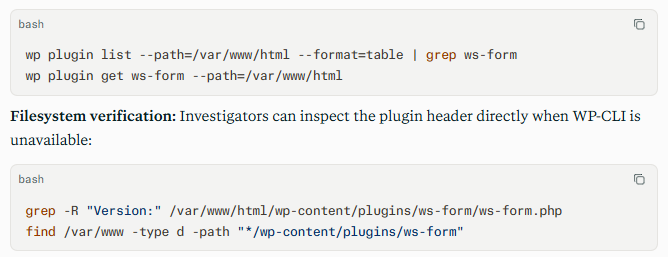
Scanner signatures: Vulnerability scanners should flag WordPress installations where plugin slug ws-form is detected at version 1.10.80 or lower. Detection should be correlated with public reachability of WS Form LITE submission endpoints, rather than relying solely on a plugin inventory result. The affected product and version range are documented in the NVD record.
Log indicators: Defenders should review web-server, web application firewall, and WordPress logs for unusual bursts of POST requests to form endpoints; malformed or unexpectedly long form metadata; serialized PHP-object markers such as O:; and repeated submissions from a single source or distributed addresses.
Behavioral anomalies: Relevant indicators include new or modified PHP files, unexpected administrator accounts, abnormal plugin or theme file changes, outbound network connections from the web server, unexplained PHP errors, or modifications to site content and redirects.
C — Mitigation & Remediation
- Immediate (0–24h): Identify every WordPress environment with WS Form LITE installed, including production, staging, development, and forgotten campaign sites. Confirm whether the plugin version is 1.10.80 or earlier and whether public forms accept unauthenticated submissions. If a vendor-supported fixed release is available, apply it first through normal change-control procedures and validate form functionality afterward. If no confirmed fixed release is available, disable or restrict affected public forms where business risk warrants it. Public reporting noted no identified safe release at the time of assessment.
- Short-term (1–7d): Review the complete plugin and theme inventory for known deserialization risks or potential POP chains. Remove unused, abandoned, or unneeded extensions. Apply pending WordPress core, plugin, and theme security updates after testing. Search server logs and file-integrity records for suspicious submissions, unauthorized changes, unexpected PHP artifacts, administrator-account creation, redirects, or outbound traffic. Reset privileged WordPress, hosting-control-panel, and deployment credentials if compromise indicators are found.
- Long-term (ongoing): Establish a documented WordPress asset inventory, including plugin owners, versions, internet exposure, patch status, and business purpose. Use a web application firewall to restrict malicious request patterns and rate-limit abusive form submissions, while recognizing that it is an interim layer rather than a replacement for remediation. Implement routine authenticated vulnerability scanning, external attack-surface monitoring, file-integrity monitoring, and tested backups. Segment website hosting from internal systems and restrict file-system and database privileges so a web-layer compromise has less opportunity to expand.
D — Best Practices
- Maintain an authoritative inventory of every WordPress site, plugin, theme, version, owner, and public endpoint so vulnerable components can be identified quickly.
- Remove unused plugins and themes rather than leaving inactive software on servers, because dormant code can still create exposure.
- Treat public form handlers as high-risk internet-facing functionality and protect them with rate limiting, web application firewall rules, logging, and regular security testing.
- Avoid unsafe deserialization of attacker-controlled data in custom WordPress development, and use data formats and validation methods that do not instantiate arbitrary objects.
- Perform periodic penetration testing that evaluates chains across plugins, themes, custom code, hosting configuration, credentials, and administrative controls rather than evaluating components in isolation
Leave Comment