
CVE-2026-43805: Apple Operating System Race Condition - What It Means for Your Business and How to Respond
Introduction
CVE-2026-43805 is a critical vulnerability in several Apple operating systems that could allow a malicious application to disrupt a device or write to protected kernel memory. For organizations across the United States and Canada, this matters because iPhones, iPads, Macs, and Apple Watches are deeply embedded in daily work, customer communication, remote access, and mobile productivity.
The vulnerability is especially significant because it affects widely deployed Apple platforms and carries a critical severity rating. Businesses that delay updates may leave employees, executives, contractors, and customer-facing devices exposed to system instability or deeper compromise.
This post explains what CVE-2026-43805 means for your organization, who is affected, practical business scenarios, and the actions your IT and security teams should take. A technical appendix provides detection, verification, and remediation guidance for security engineers and IT administrators.
Background & History
Apple published CVE-2026-43805 on July 27, 2026, identifying a race condition that was addressed through improved state handling. The issue affects iOS and iPadOS versions before 26.6, macOS Sonoma versions before 14.8.8, macOS Sequoia versions before 15.7.8, macOS Tahoe versions before 26.6, and watchOS versions before 26.6.
Apple, acting as the CVE Numbering Authority, described the flaw as one that could allow an application to cause unexpected system termination or write kernel memory. CISA’s vulnerability enrichment assigns it a CVSS 3.1 base score of 9.8, placing it in the critical severity range.
In plain language, a race condition occurs when parts of a system access the same resource at nearly the same time without proper coordination. In this case, the flaw involves Apple’s kernel, the core software layer that controls hardware, memory, and system security. The vulnerability is tracked as CWE-362, a race condition caused by improper synchronization of a shared resource.
The key remediation milestone is straightforward: Apple fixed the issue in iOS 26.6, iPadOS 26.6, macOS Sequoia 15.7.8, macOS Sonoma 14.8.8, macOS Tahoe 26.6, and watchOS 26.6.
What This Means for Your Business
If your organization uses Apple devices, this vulnerability creates a direct operational and security risk. A successful exploit could crash a device, interrupt work, or potentially allow an attacker to gain a stronger foothold in the operating system. Because kernel memory controls fundamental system behavior, an attacker who achieves kernel-level access may be able to bypass important security boundaries.
For a business, the immediate concern is continuity. A crashed iPhone, iPad, or Mac can prevent an employee from accessing email, collaboration tools, customer records, point-of-sale systems, or remote work applications. If the affected device belongs to an executive, finance professional, developer, or field worker, the disruption can extend beyond that individual.
The data risk is also material. Apple devices frequently hold corporate email, documents, authentication tokens, saved passwords, customer communications, and access to cloud services. A compromise involving kernel memory could expose sensitive information or enable further attacks against connected business systems.
Reputation and compliance risks follow closely behind. A security incident involving customer data, regulated information, or business communications can trigger customer concerns, contractual obligations, breach-notification requirements, and regulatory scrutiny. Organizations in healthcare, financial services, legal services, government contracting, and retail should treat unpatched mobile and desktop fleets as part of their overall attack surface.
The practical response is not panic. It is rapid inventory, prioritized patching, and confirmation that Apple devices used for sensitive work are updated to the fixed versions.
Real-World Examples
Regional financial services firm: A regional bank issues iPhones and MacBooks to advisors, loan officers, and executives. If an employee’s unpatched device is compromised, attackers could gain access to corporate email, client communications, and authenticated business applications, creating exposure for sensitive customer information and potential regulatory reporting obligations.
Mid-sized healthcare provider: Clinicians and administrative staff use iPads to access scheduling systems, patient portals, and internal messaging. A device crash during a patient-facing workflow could delay care coordination, while a deeper compromise could place protected health information and connected clinical systems at risk.
E-commerce retailer: Store managers and warehouse teams rely on iPhones and iPads for inventory, order fulfillment, and customer service. A successful exploit could interrupt operations during peak sales periods, delay shipments, and expose customer order or payment-related communications stored on affected devices.
Professional services firm: A consulting company provides MacBooks to remote employees who handle client contracts, financial models, and strategic documents. A kernel-level compromise on one endpoint could jeopardize confidential client material, undermine client trust, and create contractual or legal consequences if confidential information is exposed.
Am I Affected?
- You are affected if your organization uses iPhones or iPads running iOS or iPadOS earlier than version 26.6.
- You are affected if Macs run macOS Sonoma earlier than version 14.8.8.
- You are affected if Macs run macOS Sequoia earlier than version 15.7.8.
- You are affected if Macs run macOS Tahoe earlier than version 26.6.
- You are affected if Apple Watches run watchOS earlier than version 26.6.
- You are at higher risk if Apple devices are used for corporate email, customer data, remote access, privileged administration, or regulated information.
- You should verify managed devices through your mobile device management platform and confirm that updates have actually installed, rather than assuming automatic updates are enabled.
- You are not affected if every relevant Apple device has been updated to the applicable fixed version and you can verify that update through inventory or endpoint management tooling.
Key Takeaways
- CVE-2026-43805 is a critical race condition in Apple operating systems that could allow an application to crash a device or write kernel memory.
- The vulnerability affects iOS, iPadOS, macOS, and watchOS versions released before Apple’s July 2026 fixes.
- Businesses face risks to productivity, sensitive data, customer trust, and regulatory compliance when Apple devices remain unpatched.
- Organizations should identify all Apple endpoints, prioritize devices with access to sensitive systems, and verify that updates have completed successfully.
- Patching is the primary remedy, supported by endpoint visibility, application controls, and a repeatable mobile and desktop update process.
Call to Action
If your organization relies on Apple devices, do not wait for a security incident to reveal gaps in endpoint coverage. IntegSec can help you assess exposure, validate patch status, test detection and response capabilities, and reduce the risk posed by vulnerabilities across your environment. Contact IntegSec for a professional penetration test and a practical, business-focused path to stronger cybersecurity resilience at https://integsec.com.
Technical Appendix
A — Technical Analysis
CVE-2026-43805 is a race condition in Apple’s kernel-related IOKit/DriverKit functionality, specifically involving improper synchronization around a shared resource. Apple addressed the issue through improved state handling, preventing a timing-dependent condition that could otherwise lead to unexpected system termination or kernel memory writes.
The vulnerability is classified as CWE-362, Concurrent Execution using Shared Resource with Improper Synchronization. The CISA-assigned CVSS 3.1 vector is CVSS:3.1/AV:N/AC:L/PR:N/UI:N/S:U/C:H/I:H/A:H, yielding a base score of 9.8. This indicates network attack vector, low attack complexity, no required privileges, no user interaction, no scope change, and high confidentiality, integrity, and availability impact.
The official vulnerability description states that an application may be able to cause unexpected system termination or write kernel memory. The affected component is the Apple operating system kernel environment, with public technical analysis associating the issue with IOKit IODMACommand DriverKit remote procedure call handling.
The authoritative references are the CVE record and NVD entry, both published on July 27, 2026, along with Apple’s platform-specific security release notes.
B — Detection & Verification
Version enumeration commands:
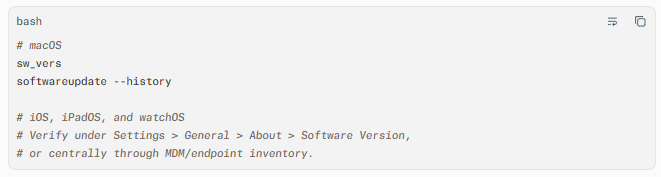
Scanner signatures: Configure vulnerability scanners and MDM compliance rules to flag iOS and iPadOS below 26.6, macOS Sonoma below 14.8.8, macOS Sequoia below 15.7.8, macOS Tahoe below 26.6, and watchOS below 26.6.
Log indicators: Review endpoint telemetry for unexpected kernel panics, repeated application crashes, abnormal DriverKit or IOKit activity, and unexplained device restarts. Preserve panic reports and correlate them with recently installed or executed applications.
Behavioral anomalies: Monitor for unusual privilege transitions, unexpected access to protected system resources, anomalous process behavior following app installation, and endpoint agents stopping or restarting without an authorized change.
Network exploitation indicators: The CVSS vector indicates network reachability and no user interaction, but public vendor guidance describes the impact in terms of an application causing termination or kernel memory writes. Prioritize endpoint and kernel-level telemetry over relying solely on perimeter network signatures.
C — Mitigation & Remediation
- Immediate (0–24 hours): Inventory all Apple endpoints and identify devices running vulnerable OS versions. Prioritize devices used by administrators, executives, finance and legal personnel, developers, and staff with access to sensitive customer or regulated data. Push the applicable Apple update through MDM and require installation within the maintenance window.
- Short-term (1–7 days): Update all remaining managed devices to iOS 26.6, iPadOS 26.6, macOS Sequoia 15.7.8, macOS Sonoma 14.8.8, macOS Tahoe 26.6, or watchOS 26.6, as applicable. Verify successful installation through MDM, endpoint management, or compliance reporting rather than relying on user self-reporting. For devices that cannot be patched immediately, restrict installation of unapproved applications, limit access to sensitive systems, increase endpoint monitoring, and isolate high-risk or unmanaged devices from critical networks.
- Long-term (ongoing): Establish a defined SLA for Apple operating-system updates, with accelerated handling for critical vulnerabilities. Maintain complete asset inventory across corporate-owned and BYOD devices, enforce OS version compliance, test critical applications before broad deployment, and include Apple endpoints in routine vulnerability management, endpoint detection, and penetration testing programs.
The official vendor patch is the primary remediation. Interim controls reduce exposure but do not replace updating affected Apple operating systems.
D — Best Practices
- Maintain an accurate, continuously refreshed inventory of all Apple devices, including corporate-owned, BYOD, and contractor endpoints.
- Enforce minimum OS-version requirements through MDM and block access to corporate resources from noncompliant devices.
- Apply critical Apple security updates on a prioritized schedule, with faster handling for kernel-level or remotely exploitable issues.
- Restrict application installation to approved sources and review applications with elevated system entitlements or DriverKit-related functionality.
- Monitor endpoints for kernel panics, abnormal process behavior, and unexpected privilege or system-resource activity.
- Include Apple mobile and desktop endpoints in regular penetration testing, vulnerability scanning, and incident response exercises
Leave Comment