
CVE-2026-43778: Apple Kernel Memory Bug - What It Means for Your Business and How to Respond
Introduction
CVE-2026-43778 is a critical vulnerability in the core software that runs Apple devices. It affects iPhones, iPads, Macs, Apple TVs, Apple Vision Pro devices, and Apple Watches, making it relevant to nearly every organization that supports Apple hardware for employees, executives, or customers.
Because the flaw sits in the operating system kernel, a successful attack could crash a device or corrupt protected system memory. That creates risks beyond a single malfunctioning device: interrupted work, exposure of sensitive information, and potential compromise of business applications.
This post explains who is affected, what the vulnerability means for your business, and the practical steps to reduce risk. A technical appendix provides detection, verification, and remediation guidance for security engineers and IT teams.
Background & History
Apple published CVE-2026-43778 on July 27, 2026, and updated the record on August 17, 2026. Apple is the assigning authority for the vulnerability, and the issue was addressed through improved memory management in Apple’s kernel.The weakness is a use-after-free issue: software releases memory that is still referenced, allowing an application to interact with memory in an unsafe way. Apple states that an app may be able to cause unexpected system termination or corrupt kernel memory.
The U.S. Cybersecurity and Infrastructure Security Agency’s enriched vulnerability data rates the issue 9.8 out of 10, or Critical, using the vector CVSS:3.1/AV:N/AC:L/PR:N/UI:N/S:U/C:H/I:H/A:H. The vulnerability is classified as CWE-416, Use After Free.
Apple fixed the issue in iOS and iPadOS 18.7.10 and 26.6, macOS Sonoma 14.8.8, macOS Sequoia 15.7.8, macOS Tahoe 26.6, tvOS 26.6, visionOS 26.6, and watchOS 26.6.
What This Means for Your Business
If your organization uses Apple devices, this vulnerability matters because it affects the foundation of the device rather than one application. A compromised or unstable kernel can undermine the protections that separate employee apps, business data, and the underlying operating system.
Operationally, the most visible impact is device instability. A crash during a customer interaction, field visit, clinical workflow, or remote-work session can delay service and force employees onto unmanaged or less secure alternatives.
The more serious concern is data protection. Kernel memory corruption can create a path toward privilege escalation, allowing an attacker to move from a normal application context toward broader control of the device. On a device used for email, file access, customer records, financial tools, or administrative systems, that can expose confidential business information.
There are also compliance and reputational consequences. Organizations subject to privacy, financial, healthcare, or contractual security obligations may need to demonstrate timely patching and endpoint risk management. A preventable endpoint compromise can trigger incident-response costs, customer notifications, regulatory scrutiny, and loss of trust.
The appropriate response is not panic. It is rapid asset visibility, prioritized patching, and confirmation that mobile and Mac fleets are covered by your security program.
Real-World Examples
Regional financial services firm:
A regional bank issues iPhones to relationship managers who access customer accounts and approve transactions. An unpatched device compromised through a malicious app could expose client communications or become a stepping stone toward corporate resources, creating regulatory and customer-trust exposure.
Mid-sized healthcare provider:
Clinicians use iPads for scheduling, secure messaging, and access to patient information. A kernel-level crash during patient care could disrupt access to essential systems, while a successful memory-corruption attack could jeopardize protected health information and compliance obligations.
Distributed professional-services company:
A consulting firm relies on MacBooks for client deliverables, contracts, and internal collaboration. If endpoint management lags behind Apple’s release cycle, a vulnerable laptop used on client networks could become an entry point into sensitive project data.
Small e-commerce business:
A small retailer uses iPhones for inventory, payment-related workflows, and customer support. Even without a large IT team, an unmanaged device that crashes or is compromised can interrupt sales operations and expose customer communications.
Am I Affected?
- You are affected if your organization manages or permits Apple iPhones or iPads running iOS or iPadOS earlier than 18.7.10 or earlier than 26.6.
- You are affected if Macs run macOS Sonoma earlier than 14.8.8, macOS Sequoia earlier than 15.7.8, or macOS Tahoe earlier than 26.6.
- You are affected if Apple TV, Apple Vision Pro, or Apple Watch devices run versions earlier than 26.6.
- You are at higher risk if employees install applications from outside your approved app catalog or use devices without mobile device management.
- You are at higher risk if Apple endpoints can access sensitive systems, customer data, financial platforms, or administrative tools.
- You should treat the issue as urgent even if you have no evidence of exploitation, because the vulnerability affects core operating-system components.
- You are not affected if every relevant Apple device has been updated to the applicable fixed version and your endpoint inventory confirms that no older devices remain in service.
Key Takeaways
- CVE-2026-43778 is a critical use-after-free vulnerability in Apple’s kernel that can allow an app to crash a device or corrupt protected memory.
- The flaw affects a broad range of Apple platforms, including iPhone, iPad, Mac, Apple TV, Apple Vision Pro, and Apple Watch.
- Business impact can include operational disruption, exposure of sensitive data, compliance challenges, and reputational harm.
- Organizations should identify all Apple endpoints, prioritize devices with access to sensitive systems, and apply Apple’s fixed releases promptly.
- Endpoint management, application controls, and vulnerability-management processes reduce the chance that a kernel-level flaw becomes a business-level incident.
Call to Action
If your organization uses Apple devices, do not wait for an incident to test your endpoint defenses. IntegSec can help you assess exposure, validate patch coverage, and identify the paths an attacker could use from endpoints into your critical systems. Visit https://integsec.com to schedule a penetration test and strengthen your cybersecurity risk-reduction program.
Technical Appendix
A — Technical Analysis
CVE-2026-43778 is a use-after-free vulnerability, tracked as CWE-416, in the Apple kernel. A use-after-free condition occurs when memory is released while a pointer to that memory remains in use, potentially enabling memory corruption or unexpected system termination. Apple addressed the condition through improved memory management.
Apple’s advisory language describes a local application as the trigger: “An app may be able to cause unexpected system termination or corrupt kernel memory.” The affected component is the operating-system kernel across Apple’s device platforms.
CISA-ADP assigns a CVSS 3.1 base score of 9.8 Critical, with the vector CVSS:3.1/AV:N/AC:L/PR:N/UI:N/S:U/C:H/I:H/A:H. Security teams should reconcile that network-based vector with Apple’s application-triggered description and validate exploitability in the context of their own device fleet and application controls.
Affected versions include iOS and iPadOS before 18.7.10 and before 26.6; macOS before 14.8.8, 15.7.8, and 26.6; and tvOS, visionOS, and watchOS before 26.6. The NVD record is available at https://nvd.nist.gov/vuln/detail/cve-2026-43778.
B — Detection & Verification
Version enumeration commands:
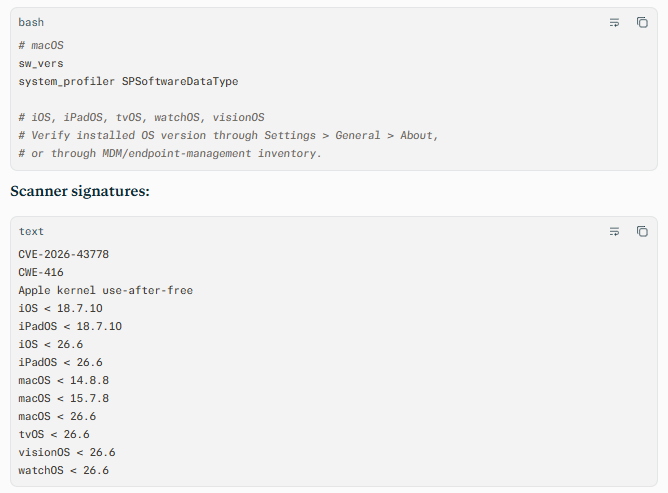
Log and behavioral indicators:
- Unexpected kernel panics, repeated device restarts, or abnormal system termination events.
- Crash reports referencing kernel components, memory-management faults, or corrupted kernel memory.
- Unusual application behavior followed by device instability, particularly after installing or executing a new application.
- Endpoint-management alerts showing devices that remain below the fixed OS versions.
- Mobile threat defense alerts involving suspicious applications, privilege-related behavior, or abnormal system-level activity.
Network exploitation indicators:
- Because Apple describes an application-triggered condition, prioritize endpoint telemetry over network signatures.
- Monitor for downloads or installation of unapproved applications, unusual certificate or profile installation, and unexpected outbound connections immediately following application execution.
- Correlate device crashes with application-install events, user reports, and endpoint-management inventory changes.
C — Mitigation & Remediation
- Immediate (0–24h): Inventory all Apple endpoints and identify devices running vulnerable versions. Prioritize iPhones, iPads, and Macs with access to email, customer data, financial systems, administrative consoles, or sensitive intellectual property. Apply Apple’s official updates first: iOS and iPadOS 18.7.10 or 26.6, macOS Sonoma 14.8.8, macOS Sequoia 15.7.8, macOS Tahoe 26.6, and tvOS, visionOS, or watchOS 26.6.
- Short-term (1–7d): For devices that cannot be patched immediately, restrict installation of unapproved applications, block untrusted configuration profiles, and limit access to high-value systems until updates are complete. Use MDM to enforce OS-version compliance, accelerate update installation, and isolate noncompliant devices from corporate resources. Review crash reports and endpoint telemetry for signs of instability or suspicious application activity.
- Long-term (ongoing): Incorporate Apple operating-system updates into a defined patch SLA based on device criticality. Maintain a complete asset inventory across iOS, iPadOS, macOS, tvOS, visionOS, and watchOS. Test updates through a controlled pilot group, enforce application allowlisting where appropriate, and validate that endpoint-protection, MDM, and vulnerability-management tools report consistent device compliance.
D — Best Practices
- Maintain an accurate, continuously updated inventory of all Apple endpoints, including employee-owned devices used for work.
- Enforce prompt operating-system updates through MDM, with accelerated installation for high-risk or privileged devices.
- Restrict application installation to approved enterprise catalogs and review new applications before broad deployment.
- Monitor kernel panics, crash reports, and endpoint-management compliance data for patterns that may indicate exploitation or unstable software.
- Include Apple endpoints in regular penetration testing, endpoint-hardening reviews, and incident-response exercises focused on privilege escalation and lateral movement
Leave Comment