
CVE-2026-4357: Embed HTML5 Game WordPress Plugin File Upload Bug - What It Means for Your Business and How to Respond
Introduction
CVE-2026-4357 is a critical vulnerability in the Embed HTML5 Game WordPress plugin that could allow an attacker to take control of a website without a password. For any organization that relies on WordPress for marketing, customer service, sales, or public communications, this is not merely a technical inconvenience: an attacker who compromises the site can redirect customers, steal information, distribute malware, or damage trust in your brand. The risk is especially significant because the flaw can be exploited remotely and without valid credentials. This post explains who is exposed, what the business consequences may be, and the practical actions your team should take to contain and remediate the issue.
Background & History
CVE-2026-4357 was published on September 2, 2026, and affects the Embed HTML5 Game WordPress plugin through version 1.3. The vulnerability was reported by Mike Gozdiskowski and assigned by WPScan; it received a CVSS v3.1 base score of 10.0, the highest severity rating.
In plain language, the plugin fails to control both who can upload files and what kinds of files are accepted. An attacker can upload a malicious PHP file, commonly called a backdoor, and then use it to run commands on the web server. WPScan publicly documented the issue on April 21, 2026, and CISA included it in its vulnerability summary for the week of August 31, 2026.
What This Means for Your Business
If your WordPress site uses this plugin, an attacker may be able to gain broad control over the website and its hosting environment. That can disrupt online sales, lead capture, appointment booking, customer portals, and other revenue-related functions. A compromised site can also be used to host phishing pages, redirect visitors to malicious destinations, or serve malware to customers and employees.
The data consequences depend on what your WordPress environment can access. Customer records, form submissions, payment-related pages, administrative credentials, and connected business systems may all be at risk if the attacker obtains sufficient access. Even when no customer data is ultimately stolen, a successful compromise can trigger incident-response costs, forensic investigation, customer notifications, and regulatory review.
Reputational harm can outlast the technical cleanup. Customers who encounter a defaced page, suspicious redirect, or malware warning may question whether their information is safe with you. For organizations in healthcare, financial services, education, government contracting, or retail, a website compromise can also create compliance and contractual exposure, particularly where security controls and breach-response obligations apply.
Real-World Examples
Regional Bank: A regional bank uses WordPress for financial-literacy resources and branch information. An attacker uploads a backdoor, redirects visitors to a fraudulent login page, and harvests credentials. The bank faces customer notifications, increased call-center volume, and heightened scrutiny from regulators and partners.
Mid-Sized Healthcare Provider: A clinic uses WordPress for patient education and appointment requests. A compromised plugin allows attackers to alter pages and potentially access form submissions containing personal information. The organization must investigate whether protected health information was exposed while managing patient trust and operational disruption.
E-Commerce Retailer: An online retailer embeds games in seasonal marketing campaigns. An attacker injects malicious code that redirects shoppers during a high-traffic promotion. Lost sales, abandoned carts, payment-page suspicion, and advertising costs can quickly exceed the cost of prevention.
Professional Services Firm: A small consulting firm uses WordPress primarily for lead generation. The site is compromised and used to send spam or host malicious content, causing its domain reputation to decline. Email deliverability suffers, prospective clients encounter security warnings, and the firm loses credibility with enterprise buyers.
Am I Affected?
- You are running WordPress and have the Embed HTML5 Game plugin installed.
- Your installed version of Embed HTML5 Game is version 1.3 or earlier; the published affected range is version 0 through 1.3.
- Your website permits public internet access to the WordPress administration or plugin-related upload functionality.
- You cannot confirm that the plugin has been removed, disabled, or replaced with a securely maintained alternative.
- You have not recently reviewed upload directories and WordPress files for unexpected PHP files, unfamiliar administrator accounts, or unauthorized code changes.
- Your website handles customer data, payments, logins, patient information, or other sensitive business functions, increasing the potential impact of compromise.
Key Takeaways
- CVE-2026-4357 affects the Embed HTML5 Game WordPress plugin through version 1.3 and carries a maximum CVSS score of 10.0.
- An unauthenticated attacker may upload a PHP backdoor and potentially gain control of the affected website.
- Business exposure includes operational disruption, data compromise, malware distribution, reputational damage, and possible compliance consequences.
- Organizations should immediately determine whether the plugin is present and remove or disable it if no patched version is available.
- Removal alone is not enough if exploitation may already have occurred; teams should investigate for persistence and unauthorized changes.
Call to Action
If you operate WordPress sites, do not wait for a security warning to tell you whether this plugin is present. IntegSec can help you identify exposed assets, validate exploitation risk, investigate signs of compromise, and strengthen the controls that prevent similar incidents. Visit https://integsec.com to schedule a penetration test and take a practical, business-focused approach to reducing cybersecurity risk.
Technical Appendix
A — Technical Analysis
CVE-2026-4357 is an unauthenticated arbitrary file upload vulnerability in the Embed HTML5 Game WordPress plugin, affecting versions 0 through 1.3. The root cause is inadequate authorization and insufficient validation of uploaded file types, classified as CWE-434, Unrestricted Upload of File with Dangerous Type.
The attack vector is network-based, with low attack complexity, no privileges required, and no user interaction required. The CVSS v3.1 vector is CVSS:3.1/AV:N/AC:L/PR:N/UI:N/S:C/C:H/I:H/A:H, producing a base score of 10.0. An attacker can submit a PHP file through the plugin’s upload functionality; if the web server executes PHP from the upload location, the uploaded file becomes a web shell or backdoor capable of remote code execution. The NVD reference is https://nvd.nist.gov/vuln/detail/CVE-2026-4357.
B — Detection & Verification
Version enumeration commands:
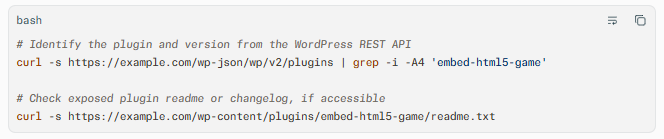
Scanner signatures: Configure vulnerability scanners to flag the embed-html5-game plugin at versions 1.3 or lower. Prioritize authenticated WordPress inventory checks, plugin-directory enumeration, and checks for the plugin slug embed-html5-game.
Log indicators:
- Unexpected POST requests to plugin-related upload endpoints.
- Upload requests from unfamiliar IP addresses, especially those followed by requests to newly created
.phpfiles. - Requests for PHP files in
wp-content/uploads/or other directories that should contain only media assets. - New administrator accounts, altered plugin files, or unexpected changes to core WordPress files.
Behavioral anomalies and network indicators: Monitor for outbound connections from the web server to unfamiliar destinations, unusual process execution by the PHP-FPM or web-server user, and creation of PHP files immediately after upload activity. Public proof-of-concept reporting increases the likelihood of opportunistic scanning, so alert on repeated requests targeting the plugin.vuln
C — Mitigation & Remediation
- Immediate (0–24h): Identify every WordPress installation using Embed HTML5 Game and deactivate and remove the plugin. As of the available advisories, no patched version was documented, so removal is the primary remediation. If removal is temporarily impossible, block access to the plugin’s upload endpoint at the web application firewall or web-server layer and restrict direct execution of PHP in upload directories.
- Short-term (1–7d): Conduct a compromise assessment. Review upload directories for unexpected PHP files, inspect WordPress users and roles, compare plugin and core files against known-good sources, rotate administrative and database credentials, and review web-server, application, and WAF logs for exploitation activity. Preserve relevant logs and potentially malicious files for incident response before deletion.
- Long-term (ongoing): Establish an inventory of WordPress plugins and themes, remove unused components, and require security review before introducing new plugins. Apply vendor patches promptly when available, enforce least privilege for WordPress administrators, restrict file-upload functionality, deploy managed WAF protection, and include web applications in routine penetration testing and vulnerability management.
D — Best Practices
- Maintain a complete, continuously updated inventory of WordPress plugins, themes, versions, and owners.
- Remove plugins that are unused, unsupported, or lacking a timely security patch.
- Enforce strict upload controls: authenticate uploaders, validate file types, store uploads outside executable paths, and disable PHP execution in upload directories.
- Apply the principle of least privilege to WordPress accounts, databases, and server-level service users.
- Monitor file integrity, authentication events, upload activity, and outbound network connections for signs of web-shell persistence
Leave Comment