
CVE-2026-39875: macOS CUPS Privilege Escalation Bug - What It Means for Your Business and How to Respond
Introduction
CVE-2026-39875 is a high-severity security vulnerability in Apple macOS that can allow a malicious application already running on a Mac to obtain the highest level of system access. For organizations across the United States and Canada that rely on Macs for executive workstations, creative teams, software development, financial operations, or remote staff, this turns an apparently limited endpoint incident into a potentially serious business exposure.
The issue does not begin with an internet-based break-in by itself. Instead, it increases the damage an attacker can cause after they persuade a user to run a harmful application, compromise a standard user account, or gain initial access through another weakness. Once elevated access is obtained, normal operating-system protections may no longer meaningfully limit the attacker.
This article explains the business implications of CVE-2026-39875, provides practical scenarios and an affected-system checklist, and outlines a focused response plan. A technical appendix follows for security engineers, IT administrators, and penetration testers.
S1 — Background & History
Apple disclosed CVE-2026-39875 on July 27, 2026, in security updates for macOS Tahoe 26.6, macOS Sequoia 15.7.8, and macOS Sonoma 14.8.8. The flaw affects the Common UNIX Printing System, commonly called CUPS, which supports printing functions on macOS. Apple described the underlying issue as a permissions problem corrected through additional restrictions. Its stated impact is that a malicious app may be able to gain root privileges, the highest level of control on a Mac.
The issue was reported by Dallas Dubs, Aaron Grattafiori of the NVIDIA AI Red Team, XBreach.ai, and Andreas Jaegersberger and Ro Achterberg of Nosebeard Labs. The U.S. Cybersecurity and Infrastructure Security Agency assigned a CVSS 3.1 score of 7.8 out of 10, classified as High. NVD published the record on July 27, 2026, and lists affected releases as Sonoma versions before 14.8.8, Sequoia versions before 15.7.8, and Tahoe versions before 26.6.
S2 — What This Means for Your Business
For your business, CVE-2026-39875 is an endpoint-risk multiplier. An attacker needs a foothold on an affected Mac, such as a compromised employee account or a malicious app that someone has installed. The vulnerability can then enable that attacker to obtain system-level control rather than remaining limited to the employee’s normal account. This makes it easier to interfere with security software, establish long-term access, alter local configurations, and pursue sensitive data accessible from the device or its connected services.
Operationally, a compromised Mac can become a staging point for fraud, data theft, ransomware deployment, or unauthorized access to cloud systems. The risk is especially relevant where Macs hold client files, source code, financial documents, health information, credentials, or access to enterprise collaboration platforms.
The consequences also extend beyond the affected device. A security incident may interrupt employee productivity, require forensic review and device rebuilding, and trigger contract, privacy, or breach-notification obligations. U.S. and Canadian organizations may face differing provincial, state, sector, and customer requirements, but the practical expectation is consistent: demonstrate reasonable patch management, access control, and incident response. Prompt remediation helps reduce exposure while creating evidence that you acted responsibly.
S3 — Real-World Examples
Regional bank: A finance employee downloads a malicious application disguised as a document utility onto an unpatched Mac. If the application uses CVE-2026-39875 to gain system-level access, an attacker could attempt to collect browser sessions, manipulate local security settings, and use the employee’s access to pursue internal financial systems. The resulting investigation could disrupt customer-facing work and raise scrutiny around safeguards for sensitive financial information.
Mid-sized law firm: A legal assistant’s Mac contains case materials and connects to a document-management platform. A local compromise escalated through this weakness could allow an intruder to persist on the workstation and search for privileged client information. Even where no files leave the environment, the firm may need to assess contractual notifications, client trust, and the cost of validating the integrity of affected matters.
North American software company: A developer working remotely uses an affected Mac to access source repositories and cloud administration tools. Root-level control could help an attacker disable endpoint controls or harvest tokens that expose development pipelines. This can delay releases, create software supply-chain concerns, and require credential rotation across engineering systems.
Canadian healthcare services provider: A staff member uses a Mac to access scheduling, billing, and patient-related workflows. A successful endpoint compromise could create a potential privacy incident and force the organization to temporarily remove devices from service for containment and review. The disruption can affect service delivery even if the organization confirms that protected information was not accessed.
S4 — Am I Affected?
- You are likely affected if you run macOS Sonoma 14.0 through 14.8.7 on any company-owned, contractor-managed, or personally owned Mac used for business.
- You are likely affected if you run macOS Sequoia 15.0 through 15.7.7 on devices that access company email, cloud storage, source code, customer information, or administrative systems.
- You are likely affected if you run macOS Tahoe 26.0 through 26.5 on managed or unmanaged workstations.
- You are not affected by this specific vulnerability if all applicable Macs have been updated to macOS Sonoma 14.8.8, macOS Sequoia 15.7.8, or macOS Tahoe 26.6 or later.
- You should treat your exposure as unresolved if your asset inventory cannot reliably identify macOS versions, if software updates are deferred, or if remote employee Macs fall outside your management platform.
- You should prioritize review if users can install applications without approval, if Macs handle sensitive data, or if endpoint security controls are not centrally monitored.
Key Takeaways
- CVE-2026-39875 is a high-severity macOS vulnerability that can enable a malicious application to obtain root-level privileges on an affected Mac.
- The affected software is macOS CUPS printing functionality on Sonoma before 14.8.8, Sequoia before 15.7.8, and Tahoe before 26.6.
- Your immediate priority is to identify exposed Macs, apply Apple’s security updates, and verify that updates completed successfully.
- Because this is a local privilege-escalation issue, you should also reduce the likelihood of initial compromise through application controls, endpoint monitoring, and least-privilege access.
- A documented response strengthens resilience and helps demonstrate sound security governance to customers, partners, insurers, and regulators.
Call to Action
Patching closes the known weakness, but your organization also needs confidence that no related exposure already exists across its endpoint estate. IntegSec can help you validate macOS security controls, identify privilege-escalation paths, assess remote-work risks, and prioritize remediation through practical penetration testing. Engage a team focused on deep, evidence-based cybersecurity risk reduction and turn vulnerability response into measurable security improvement. Contact IntegSec to discuss a targeted assessment.
TECHNICAL APPENDIX
A — Technical Analysis
CVE-2026-39875 is a local privilege-escalation vulnerability in the macOS implementation of CUPS. Apple characterized the flaw as a permissions issue addressed by imposing additional restrictions. NVD maps the weakness to CWE-276, Incorrect Default Permissions, and states that a malicious application may gain root privileges.
The CISA-assigned CVSS 3.1 vector is CVSS:3.1/AV:L/AC:L/PR:L/UI:N/S:U/C:H/I:H/A:H, yielding a 7.8 High score. This identifies a local attack vector, low attack complexity, required low privileges, no additional user interaction after the malicious application has execution, unchanged scope, and high impact to confidentiality, integrity, and availability.
The affected component is CUPS, including the privileged cupsd printing service. Apple’s advisory identifies the issue as CVE-2026-39875 and credits Dallas Dubs, Aaron Grattafiori, XBreach.ai, and Nosebeard Labs researchers. Apple released remediations on July 27, 2026, in macOS Sonoma 14.8.8, Sequoia 15.7.8, and Tahoe 26.6.
B — Detection & Verification
Use managed-device inventory as the primary verification method. On an individual Mac, determine the operating-system version with:
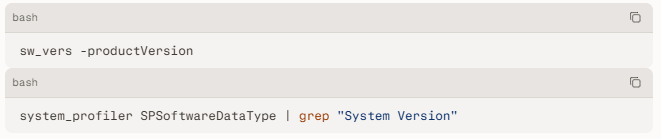
A system is vulnerable when the reported version is below Sonoma 14.8.8, Sequoia 15.7.8, or Tahoe 26.6. Scanner content should detect Apple macOS version ranges below these fixed releases and associate the result with CVE-2026-39875 and CUPS.
- Review endpoint management records for Macs whose operating-system updates are pending, failed, deferred, or unreported.
- Examine CUPS configuration and service activity for unexpected printer additions, unusual queue configuration changes, or anomalous print jobs.
- Investigate unexpected launches of printing-related utilities and changes involving
/etc/cups,/private/etc/cups, printer configuration, or privileged launch mechanisms. - Correlate suspicious local application execution with security-control tampering, new persistence artifacts, unexpected privileged processes, or changes to endpoint-detection settings.
- Treat unusual local printer administration activity as an investigation trigger, particularly on shared Macs, developer endpoints, or systems where users may execute untrusted software.
C — Mitigation & Remediation
- Immediate (0–24h): Identify every business-connected Mac running vulnerable macOS releases. Deploy Apple’s official updates first: macOS Sonoma 14.8.8, macOS Sequoia 15.7.8, or macOS Tahoe 26.6. Confirm completion through device-management telemetry rather than relying on user acknowledgement. Apple lists CVE-2026-39875 as fixed in these releases.
- Immediate (0–24h): Prioritize internet-exposed administrative users, executives, developers, shared systems, devices handling regulated or confidential data, and unmanaged remote endpoints. Isolate any endpoint showing suspicious application installation, unexpected CUPS changes, endpoint-security tampering, or signs of privilege escalation. Preserve relevant endpoint and management logs before rebuilding or reimaging the device.
- Short-term (1–7d): For devices that cannot be patched immediately, restrict unapproved application installation, enforce standard-user accounts, review local administrator assignments, and use endpoint security tooling to alert on suspicious process behavior and persistence. Where operationally feasible, limit printer administration to authorized support personnel and review CUPS configuration changes. These are compensating controls, not replacements for Apple’s security update.
- Short-term (1–7d): Validate that managed Macs report the expected fixed build, investigate missing or inconsistent inventory records, and rotate credentials or revoke active sessions if a device is suspected of compromise. Review access tokens and administrator credentials used from that device based on the scope of the investigation.
- Long-term (ongoing): Maintain update rings with defined emergency deployment criteria, require endpoint detection and response coverage, and test whether ordinary users can escalate privileges or bypass application-control policies. Incorporate macOS privilege-escalation testing into recurring vulnerability management and penetration-testing programs.
D — Best Practices
- Enforce timely operating-system updates through mobile device management and require documented exceptions with compensating controls.
- Apply least privilege by keeping daily users out of local administrator groups and limiting the use of shared administrator credentials.
- Restrict execution of unapproved software through application-control policies, managed software catalogs, and endpoint detection controls.
- Monitor privileged services and configuration changes, including printer registration, CUPS settings, persistence locations, and security-tool health.
- Maintain an accurate endpoint inventory that records operating-system versions, ownership, user assignment, encryption status, management state, and patch compliance.
Leave Comment