
CVE-2026-33696: n8n Workflow Automation Bug - What It Means for Your Business and How to Respond
Introduction
Many organizations now rely on workflow automation platforms to move data between cloud applications, process customer requests, synchronize records, and trigger business operations. When one of those platforms can be manipulated into running attacker-controlled code, the impact extends well beyond a single automated task.
CVE-2026-33696 affects n8n, a widely used open source workflow automation platform. The vulnerability can allow an authenticated user with permission to create or modify workflows to achieve remote code execution on the n8n instance. That means a compromised or malicious internal account could potentially take control of the automation server and the systems it connects to.
This post explains what CVE-2026-33696 means for your business, which organizations should investigate it, and how to respond. It also includes a technical appendix for security engineers, penetration testers, and IT teams responsible for remediation.
Background & History
CVE-2026-33696 was published on March 25, 2026, by GitHub, which served as the CVE Numbering Authority. The vulnerability affects n8n versions before 1.123.27, versions from 2.0.0 through before 2.13.3, and version 2.14.0.
The issue is a prototype pollution vulnerability in the XML and GSuiteAdmin nodes. In practical terms, an attacker who can create or edit workflows can supply specially crafted node parameters that alter the behavior of the JavaScript environment used by n8n. That manipulation can lead to remote code execution on the n8n server.
GitHub assigned the vulnerability a CVSS 4.0 base score of 9.4, rating it Critical. The fixed releases are n8n 1.123.27, 2.13.3, and 2.14.1. Organizations using affected releases should treat this as a priority patching event rather than a routine update.
What This Means for Your Business
If your organization uses n8n, this vulnerability puts the automation platform at the center of your risk picture. n8n often holds credentials, API keys, tokens, and connections to email, customer databases, finance systems, cloud storage, and other business applications. A successful exploit could expose those connections and allow an attacker to move through connected systems.
Operationally, an attacker with control of an n8n instance could disrupt automated processes, alter data flows, send unauthorized communications, or use trusted integrations to access business data. Because automation platforms often operate quietly in the background, malicious changes may not be noticed immediately.
From a data protection perspective, the risk includes exposure of customer records, employee information, financial data, intellectual property, and integration credentials. If n8n processes regulated information, a compromise may also create notification, investigation, and compliance obligations under applicable privacy and security requirements.
Reputationally, customers and partners expect automation systems to handle their data securely. A breach involving a trusted internal platform can damage confidence even when the initial weakness is limited to one tool. The central business question is not merely whether n8n is patched, but whether your workflow platform is properly access-controlled, monitored, and included in your security testing program.
Real-World Examples
Regional financial services firm: A regional bank uses n8n to synchronize loan-application data between its customer portal, document system, and core banking integrations. An attacker who obtains a low-privilege automation account could exploit the flaw to run code on the n8n server, potentially access banking credentials and expose sensitive customer information.
Mid-market healthcare provider: A healthcare organization uses n8n to transfer appointment records and patient communications between scheduling, billing, and notification systems. Exploitation could expose protected health information, interrupt patient notifications, and create regulatory and contractual consequences.
E-commerce company: An online retailer relies on n8n to update inventory, process order events, and connect marketing and fulfillment tools. A compromised workflow account could alter order routing, access customer records, or abuse connected email and payment-related integrations.
Professional services firm: A small consulting company uses n8n to automate document generation and client onboarding. Even with a limited deployment, an attacker could gain access to client files, integration credentials, and internal communications, creating reputational harm disproportionate to the size of the business.
Am I Affected?
- You are running n8n version 1.123.26 or earlier.
- You are running n8n version 2.0.0 through 2.13.2, including applicable release-candidate versions in the affected range.
- You are running n8n version 2.14.0.
- You allow users other than fully trusted administrators to create or modify workflows.
- Your n8n deployment uses or enables the XML node or GSuiteAdmin node.
- Your n8n instance stores credentials or connects to systems containing sensitive business, customer, financial, or regulated data.
- You cannot confirm the exact n8n version deployed across production, staging, containers, or self-hosted environments.
If any statement applies, inventory the deployment, determine whether workflow-editing permissions are restricted, and upgrade to a fixed release.
Key Takeaways
- CVE-2026-33696 is a critical vulnerability in n8n that can allow an authenticated workflow editor to achieve remote code execution.
- The flaw affects n8n versions before 1.123.27, versions 2.0.0 through before 2.13.3, and version 2.14.0.
- n8n often holds credentials and integrations with sensitive systems, so exploitation can create data, operational, and compliance risk.
- Organizations should upgrade to n8n 1.123.27, 2.13.3, or 2.14.1 or later as the primary remedy.
- Until patching is complete, workflow creation and editing should be limited to fully trusted users, and the XML node can be disabled as a temporary measure.
Call to Action
If n8n is part of your technology environment, do not wait for an incident to reveal gaps in access control, integration security, or vulnerability management. IntegSec can assess your exposure, validate whether the weakness is exploitable in your environment, and help prioritize practical remediation. Visit https://integsec.com to discuss a penetration test and a deeper cybersecurity risk-reduction program.
Technical Appendix
This appendix is intended for security engineers, penetration testers, and IT professionals. It assumes familiarity with JavaScript, workflow automation platforms, and enterprise patch management.
A — Technical Analysis
CVE-2026-33696 is a prototype pollution vulnerability in the XML and GSuiteAdmin nodes of n8n. An authenticated user with permission to create or modify workflows can supply crafted parameters in node configuration. Those parameters can write attacker-controlled values to Object.prototype, altering inherited behavior across the JavaScript runtime.
The weakness is classified as CWE-1321, Improperly Controlled Modification of Object Prototype Attributes, commonly known as prototype pollution. In this case, prototype pollution can be escalated to remote code execution on the affected n8n instance.
The attack vector is network-based and requires low privileges, specifically an account able to create or edit workflows. No user interaction is required. GitHub’s CVSS 4.0 vector is CVSS:4.0/AV:N/AC:L/AT:N/PR:L/UI:N/VC:H/VI:H/VA:H/SC:H/SI:H/SA:H, producing a CVSS-B score of 9.4 Critical.
The authoritative vendor advisory is GitHub Security Advisory GHSA-mxrg-77hm-89hv, and the National Vulnerability Database entry is available at https://nvd.nist.gov/vuln/detail/CVE-2026-33696.
B — Detection & Verification
Version enumeration commands:
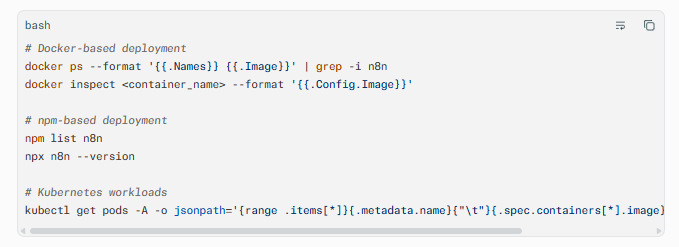
Confirm the running version, not only the version in a deployment manifest. Container images can lag behind configuration repositories or Helm values.
Scanner signatures: Configure vulnerability scanners to flag n8n versions below 1.123.27, versions 2.0.0 through 2.13.2, and version 2.14.0. Include both self-hosted servers and container images in scanning coverage.
Log indicators: Review n8n application logs for workflow creation or modification events involving the XML or GSuiteAdmin nodes. Pay particular attention to unusual node parameters, unexpected workflow edits by service accounts, and workflow executions followed by abnormal process behavior.
Behavioral anomalies: Look for new outbound connections from the n8n host, unexpected command execution, creation of unusual files, changes to workflow credentials, or workflow executions outside normal business schedules.
Network exploitation indicators: Monitor for n8n servers initiating connections to unfamiliar external hosts, unusual DNS resolution, or outbound traffic immediately following workflow edits. Correlate these events with authentication logs for accounts holding workflow-editor permissions.
C — Mitigation & Remediation
- Immediate (0–24h): Upgrade n8n to version 1.123.27, 2.13.3, or 2.14.1 or later. The vendor fix is the only complete remediation. If immediate upgrade is impossible, restrict workflow creation and editing permissions to fully trusted users only.
- Short-term (1–7d): For environments that cannot patch immediately, disable the XML node by adding
n8n-nodes-base.xmlto theNODES_EXCLUDEenvironment variable. Understand that this workaround does not fully eliminate the risk and should not replace patching. Review all workflow-editor accounts, revoke unnecessary access, rotate credentials stored in n8n, and inspect recent workflow changes. - Long-term (ongoing): Establish a repeatable patching process for automation platforms and their container images. Apply least privilege to workflow creation and editing, separate administrative duties from day-to-day automation use, and maintain an inventory of n8n instances and connected integrations. Include workflow platforms in vulnerability scanning, log monitoring, and periodic penetration testing.
D — Best Practices
- Treat workflow-editing rights as privileged access and grant them only to trusted personnel with a documented business need.
- Maintain a complete inventory of n8n deployments, including self-hosted servers, containers, staging environments, and Kubernetes workloads.
- Patch automation platforms promptly, especially when they hold integration credentials or connect to sensitive business systems.
- Rotate and scope credentials stored in workflow tools, using short-lived tokens and least-privilege permissions where supported.
- Monitor workflow changes, authentication events, and outbound network activity for signs of unauthorized automation modification
Leave Comment