
CVE-2026-25085: Copeland XWEB Pro Authentication Bypass - What It Means for Your Business and How to Respond
Introduction
CVE-2026-25085 matters because it affects the login protection on Copeland XWEB Pro supervisory controllers, devices commonly used to monitor and manage commercial refrigeration and HVAC equipment. If your organization operates cold storage, food processing, retail refrigeration, healthcare facilities, or building systems that depend on these controllers, an attacker who reaches the device could gain unauthorized administrative access.
This is not only an IT issue. A successful compromise can disrupt temperature-sensitive operations, damage inventory, create safety concerns, and complicate regulatory obligations. Businesses in the United States and Canada that use connected operational technology should treat this vulnerability as a priority for asset discovery, patching, and network access review.
This post explains what CVE-2026-25085 is, who is exposed, how it can affect operations, and the practical steps to reduce risk. A technical appendix provides detection, verification, and remediation guidance for security engineers, penetration testers, and IT teams.
Background & History
Copeland disclosed CVE-2026-25085 on February 26, 2026, and the National Vulnerability Database published the entry on February 27, 2026. The issue was coordinated through ICS-CERT, with Claroty Team82 associated with the disclosure process.
The flaw affects Copeland XWEB 300D PRO, XWEB 500D PRO, and XWEB 500B PRO controllers running firmware version 1.12.1 or earlier. In plain language, the controller can receive an unexpected result from its authentication routine and mistakenly treat it as a valid login outcome. That mistake can allow a remote attacker to bypass authentication.
Copeland rates the issue High with a CVSS v3.1 base score of 8.6, while NVD also lists a Critical 9.8 score using a broader impact calculation. Copeland has released a fix and directs customers to update XWEB Pro through its software update page or the controller’s built-in network update menu.
What This Means for Your Business
For a business that relies on refrigeration or HVAC monitoring, this vulnerability creates a direct path from a network-facing controller to operational control. An attacker who bypasses login may be able to view system status, alter settings, interfere with alarms, or use the controller as a starting point for broader network activity. The exact impact depends on your configuration, user permissions, and the systems connected to the controller.
Operationally, the most immediate concern is continuity. Temperature excursions, equipment shutdowns, missed alerts, or improper system changes can lead to spoiled inventory, interrupted production, service failures, and emergency response costs. For food, pharmaceutical, healthcare, and logistics organizations, those consequences can extend beyond one site.
From a data and compliance perspective, unauthorized access to an operational technology device can expose configuration details, network information, and operational records. It can also undermine the evidence trail needed to demonstrate that critical systems were properly controlled. Organizations subject to food safety, healthcare, privacy, or critical infrastructure expectations should document the vulnerability, remediation decision, and verification steps.
Reputationally, a preventable compromise of a facility system can erode customer trust, especially if it causes product loss or service disruption. The practical response is straightforward: identify affected controllers, remove unnecessary internet exposure, apply the vendor update, and validate that remote access is properly controlled.
Real-World Examples
Regional grocery chain: A regional grocery operator uses XWEB Pro controllers to supervise refrigeration across dozens of stores. If an internet-exposed controller is compromised, attackers could interfere with monitoring or alarms, creating a risk of spoilage, emergency maintenance costs, and lost sales across affected locations.
Cold storage and logistics provider: A third-party cold storage facility depends on continuous temperature visibility for customer inventory. A successful authentication bypass could undermine confidence in temperature records, force costly manual verification, and trigger contractual or customer-notification obligations if product integrity becomes uncertain.
Regional hospital or healthcare campus: A healthcare facility uses building and refrigeration controls to support pharmacy storage, laboratories, or food service. Unauthorized changes or lost visibility could interrupt sensitive operations, require incident documentation, and divert clinical and facilities staff from patient-facing work.
Mid-sized food manufacturer: A food producer connects plant-floor controllers to a corporate network for centralized monitoring. Compromise of one controller could expose weak network segmentation, giving an intruder a foothold that increases the cost and complexity of incident response and production recovery.
Am I Affected?
- You are running Copeland XWEB 300D PRO, XWEB 500D PRO, or XWEB 500B PRO firmware version 1.12.1 or earlier.
- You have not yet confirmed the firmware version on every XWEB Pro controller in your environment.
- You have XWEB Pro controllers reachable from the internet through public IP addresses, port forwarding, or an inadequately controlled remote-access path.
- You allow broad network access to operational technology systems from corporate, vendor, or guest networks without segmentation.
- You use shared, default, weak, or long-lived credentials on supervisory controllers or related remote-access accounts.
- You cannot confirm whether the controller has received the latest Copeland-supported firmware update.
- You lack centralized logs or alerts for unusual administrative access, configuration changes, or firmware-update activity.
Key Takeaways
- CVE-2026-25085 is an authentication bypass affecting Copeland XWEB 300D PRO, 500D PRO, and 500B PRO controllers at firmware version 1.12.1 or earlier.
- The business risk is operational disruption, inventory loss, compliance complications, and potential reputational harm, particularly for temperature-sensitive environments.
- Internet exposure and weak network segmentation materially increase the likelihood that the vulnerability can be exploited.
- Copeland has issued a fix and recommends updating XWEB Pro to the latest supported version.
- Asset inventory, controlled remote access, network segmentation, logging, and prompt patch verification are essential parts of a durable response.
Call to Action
If you operate Copeland XWEB Pro controllers or other connected refrigeration and HVAC systems, do not wait for an incident to reveal gaps in visibility or access control. IntegSec can help you identify exposed devices, validate patch status, assess segmentation and remote-access risk, and test your defenses through a focused penetration test. Visit https://integsec.com to speak with our team and take a practical, business-aligned step toward reducing cybersecurity risk.
Technical Appendix
A — Technical Analysis
CVE-2026-25085 is an authentication bypass in Copeland XWEB Pro firmware version 1.12.1 and earlier. The root cause is classified as CWE-394, Unexpected Status Code or Return Value: an unexpected return value from the authentication routine is subsequently processed as though it were a legitimate authentication result.
The affected component is the authentication handling in the XWEB Pro supervisory controller firmware. The attack vector is adjacent or network-based access to the controller’s management interface. ICS-CERT’s CVSS v3.1 vector is CVSS:3.1/AV:N/AC:L/PR:N/UI:N/S:U/C:H/I:L/A:L, indicating network reachability, low attack complexity, no required privileges, no user interaction, unchanged scope, high confidentiality impact, and low integrity and availability impact. NVD separately lists a CVSS 3.1 vector of CVSS:3.1/AV:N/AC:L/PR:N/UI:N/S:U/C:H/I:H/A:H and a Critical base score of 9.8.
The vulnerability is tracked at the NVD entry for CVE-2026-25085. Affected configurations include XWEB 300D PRO, XWEB 500D PRO, and XWEB 500B PRO firmware through version 1.12.1, inclusive.
B — Detection & Verification
Version enumeration commands
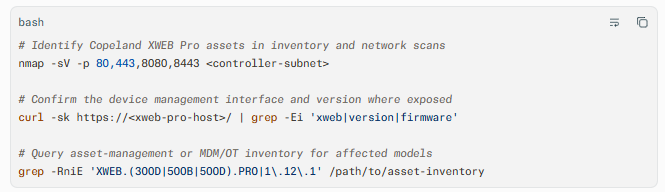
Scanner signatures
- Configure vulnerability scanners to flag Copeland XWEB 300D PRO, 500B PRO, and 500D PRO firmware at or below 1.12.1.
- Use authenticated OT discovery where available, because banner-only detection may not establish the exact firmware version.
- Correlate findings with CPE identifiers for
copeland:xweb_300d_pro_firmware,copeland:xweb_500b_pro_firmware, andcopeland:xweb_500d_pro_firmware.
Log indicators
- Authentication success events without a corresponding valid credential use, MFA event, or expected source address.
- Administrative login activity from unfamiliar internal subnets, vendor networks, or internet-facing sources.
- Configuration changes, user-account changes, or firmware-update actions outside approved change windows.
- Repeated requests to authentication endpoints followed by successful administrative access.
Behavioral anomalies
- Unexpected changes to alarm, temperature, device, or network configuration.
- New or modified user accounts, especially accounts with administrative privileges.
- Controllers initiating connections to unfamiliar external destinations.
- Sudden loss of monitoring telemetry or abnormal controller restarts.
Network exploitation indicators
- Direct connections to XWEB Pro management ports from untrusted networks.
- Traffic that reaches an authentication endpoint and then proceeds directly to privileged functions without normal session-establishment patterns.
- Port-forwarding rules or public IP exposures that route traffic to XWEB Pro controllers. Copeland specifically advises against exposing controllers through public IP addresses or port forwarding.
C — Mitigation & Remediation
1. Immediate (0–24h): Remove exposure and contain access
- Inventory all Copeland XWEB 300D PRO, 500B PRO, and 500D PRO controllers and record model, firmware version, IP address, site, owner, and internet exposure status.
- Remove public internet exposure immediately. Disable port forwarding and public IP access to XWEB Pro controllers; use a secure VPN for any necessary remote administration.
- Restrict management access to dedicated administrative networks or jump hosts through firewall rules and access-control lists.
- Review active sessions and administrative accounts, disable unnecessary accounts, and rotate credentials for affected controllers and any shared remote-access accounts.
- Increase monitoring on affected controllers, particularly for authentication events, configuration changes, and outbound connections.
2. Short-term (1–7d): Patch and validate
- Apply the official Copeland fix by updating XWEB Pro to the latest supported version. Copeland provides updates through its software update page and through the controller menu path SYSTEM, Updates, Network for internet-connected devices.
- Schedule updates during approved maintenance windows and retain a tested rollback or recovery plan appropriate for operational technology.
- After updating, verify the installed firmware version no longer reports 1.12.1 or earlier and confirm normal monitoring, alarm, and controller functionality.
- Review firewall rules, VPN configurations, vendor-access arrangements, and network segmentation. Ensure XWEB Pro controllers are isolated from user, guest, corporate, and broadly accessible OT networks.
- Search logs for signs of prior unauthorized access or unexpected changes; escalate suspected compromise through your incident-response process.
3. Long-term (ongoing): Strengthen OT security
- Maintain a continuously updated OT asset inventory that includes controller model, firmware, network location, business owner, and exposure status.
- Enforce network segmentation between operational technology, corporate IT, guest, and vendor networks.
- Require VPN-based remote access, unique named accounts, strong authentication, and periodic access reviews for controllers and supervisory systems.
- Establish a vulnerability-management process that prioritizes internet-exposed OT assets, known exploited vulnerabilities, and devices supporting safety or continuity-critical operations.
- Retain configuration backups and monitor logs centrally, while ensuring backups are protected from alteration through the same management plane.
- Include OT controllers in penetration-testing and purple-team exercises, with testing limited to authorized systems and designed to avoid disruption to production operations.
D — Best Practices
- Keep controller firmware current by subscribing to vendor security advisories and testing updates before broad deployment.
- Never expose supervisory controllers directly to the public internet; require a secured VPN for remote support and administration.
- Segment XWEB Pro controllers from corporate, guest, and vendor networks so a compromised device cannot freely reach other systems.
- Use unique administrative accounts, strong credentials, and periodic access reviews rather than shared or default accounts.
- Monitor authentication, configuration, and firmware-update events, and investigate unexpected administrative activity promptly
Leave Comment