
CVE-2026-19489: NetScaler ADC and Gateway Memory Overflow Bug - What It Means for Your Business and How to Respond
Introduction
CVE-2026-19489 is a high-severity vulnerability affecting customer-managed NetScaler ADC and NetScaler Gateway appliances. For organizations across the United States and Canada, these platforms often sit in front of business-critical applications, remote-access services, and network traffic. A disruption at this layer can quickly become an employee productivity issue, a customer-service interruption, or an availability incident that affects revenue and trust.
The vulnerability does not apply to every NetScaler deployment. It requires a particular network configuration involving Session Initiation Protocol Application Layer Gateway, commonly used in voice and communications traffic, on a Large Scale NAT group. However, organizations that meet those conditions should treat remediation as an urgent operational priority.
This article explains the business implications, offers practical examples, and provides a nontechnical checklist to help determine whether your organization may be affected. A technical appendix follows for security engineers, IT teams, and penetration testers.
S1 — Background & History
NetScaler, formerly known as Citrix ADC and Citrix Gateway, published its advisory for CVE-2026-19489 on August 19, 2026. The issue affects supported customer-managed NetScaler ADC and NetScaler Gateway deployments running vulnerable versions in the 14.1 and 13.1 release lines, as well as certain FIPS and NDcPP builds. Citrix credited Samarth Vashisht of JPMorgan Chase’s penetration-testing team for reporting the issue.
The vulnerability has a CVSS v4 base score of 8.8, which places it in the high-severity range. In plain terms, it is a software flaw that can cause the appliance to mishandle incoming data and overrun the memory space assigned to it. That can create unpredictable behavior or deny access to services routed through the appliance.
The vendor released fixed builds alongside its advisory and urged affected customers to update promptly. Canada’s Cyber Centre subsequently issued an alert aimed at IT managers and professionals, reinforcing emergency patching, configuration review, and post-update log monitoring.
S2 — What This Means for Your Business
If you operate an affected NetScaler appliance with the relevant configuration enabled, an attacker may be able to trigger instability or a denial-of-service condition remotely. The most immediate business concern is availability: employees may be unable to reach remote applications, customers may experience interruptions, and business systems that rely on the appliance for traffic delivery may become unreliable.
For your operations team, a disruption can create an urgent incident response effort involving network, infrastructure, help desk, security, and application owners. If your organization uses NetScaler to support remote work, third-party access, customer portals, or voice-related services, downtime can affect multiple groups simultaneously.
The consequences also extend beyond lost connectivity. A visible outage can erode customer confidence, especially in financial services, healthcare, professional services, retail, and public-sector environments where reliable access is expected. Contracts, service-level commitments, and regulatory obligations may require you to document how you identified, contained, and remediated the risk.
This CVE is not a reason for panic. It is a reason to establish facts quickly: identify your appliances, confirm their software versions, determine whether the affected configuration exists, and apply the vendor-supported update. Citrix states that its managed cloud services receive the necessary updates from Cloud Software Group; the primary exposure is in customer-managed deployments.
S3 — Real-World Examples
A regional bank: A regional bank uses NetScaler Gateway to provide secure access to internal systems for branch staff, loan officers, and approved service providers. An availability disruption during business hours could delay customer transactions, interrupt internal workflow, and force the bank to activate continuity procedures while it investigates the cause.
A Canadian healthcare provider: A healthcare organization relies on NetScaler ADC to deliver clinical applications and support secure remote access for administrative staff. If the appliance becomes unstable, appointment scheduling, records access, and back-office processes may be delayed, increasing operational burden even if patient-care systems remain separately available.
A mid-sized manufacturer: A manufacturer uses NetScaler to publish supplier portals and provide remote connectivity to engineering and operations personnel. A service outage could slow procurement, disrupt communications with vendors, and reduce the ability of remote teams to respond to production issues.
A North American professional-services firm: A law, accounting, or consulting firm may use NetScaler Gateway to support hybrid employees handling sensitive client work. Even a short interruption can prevent access to files and line-of-business applications, create missed deadlines, and raise client concerns about the firm’s resilience.
S4 — Am I Affected?
- You may be affected if you operate customer-managed NetScaler ADC or NetScaler Gateway appliances rather than only Citrix-managed cloud services.
- You may be affected if you run NetScaler ADC or Gateway 14.1 earlier than 14.1-73.32.
- You may be affected if you run NetScaler ADC or Gateway 13.1 earlier than 13.1-63.21.
- You may be affected if you use NetScaler ADC FIPS earlier than 14.1-73.32 FIPS, or NetScaler ADC FIPS and NDcPP earlier than 13.1-37.277.
- You may be affected if your NetScaler configuration enables SIP ALG on a Large Scale NAT group.
- You are less likely to be affected by this specific CVE if no NetScaler appliance is deployed, your appliances run vendor-fixed builds, or the required SIP ALG and Large Scale NAT configuration is absent.
- You should still validate each appliance individually because configuration and version differences can exist across production, disaster-recovery, branch, and test environments.
Key Takeaways
- CVE-2026-19489 is a high-severity NetScaler memory-overflow vulnerability with a CVSS v4 score of 8.8 that can result in unpredictable appliance behavior or denial of service.
- The risk is most relevant to customer-managed NetScaler ADC and Gateway deployments with SIP ALG enabled on a Large Scale NAT group.
- Your business impact may include remote-access outages, interrupted application delivery, delayed customer service, operational disruption, and potential compliance scrutiny.
- The vendor-supported response is to update to the fixed NetScaler release applicable to your appliance and platform build.
- You should validate both software versions and configuration conditions, then review logs and service health after remediation.
Call to Action
A patch addresses a known vulnerability, but it does not by itself confirm that your external attack surface, configurations, access controls, and monitoring are resilient. IntegSec helps organizations identify and reduce meaningful cybersecurity risk through focused penetration testing and practical remediation guidance. Contact IntegSec to assess your NetScaler exposure, validate your security controls, and strengthen the systems your employees, customers, and partners depend on.
Technical Appendix
A — Technical Analysis
CVE-2026-19489 is a NetScaler ADC and NetScaler Gateway memory-overflow vulnerability associated with improper bounds handling in memory-buffer operations. Citrix classifies the weakness as CWE-119, while the National Vulnerability Database identifies CWE-120, “Buffer Copy without Checking Size of Input,” commonly called a classic buffer overflow. The practical outcome identified by the vendor is unpredictable appliance behavior or denial of service.
The vulnerability is remotely reachable over the network and has low attack complexity under the required configuration condition. It requires no privileges and no user interaction. Citrix’s CVSS v4 vector is CVSS:4.0/AV:N/AC:L/AT:N/PR:N/UI:N/VC:L/VI:L/VA:H/SC:N/SI:N/SA:L, with a base score of 8.8. The affected condition is SIP ALG enabled on a Large Scale NAT group. The NVD record, published August 19, 2026, remains marked as awaiting enrichment and identifies affected NetScaler ADC and Gateway 13.1 and 14.1 releases.
B — Detection & Verification
Administrators should first enumerate appliance versions and inspect the running configuration for the specific prerequisite.
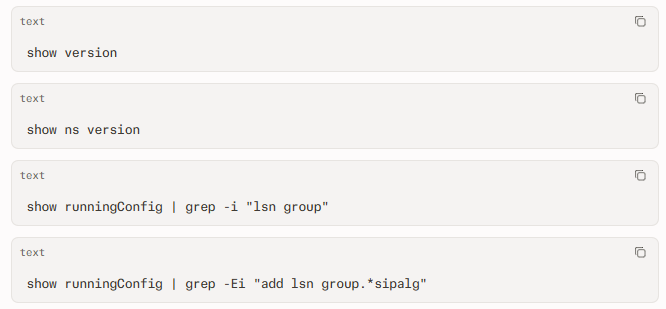
Citrix identifies the configuration pattern add lsn group.*sipalg.* as the condition to inspect when determining whether an appliance meets the CVE-2026-19489 prerequisite.
Useful verification activities include:
- Compare the reported firmware release against fixed versions: 14.1-73.32, 13.1-63.21, 14.1-73.32 FIPS, or 13.1-37.277 for relevant FIPS and NDcPP deployments.
- Configure vulnerability-scanner checks to identify NetScaler ADC or Gateway assets, enumerate firmware releases, and flag LSN configurations with SIP ALG enabled.
- Review appliance, system, and network logs for unexpected service restarts, crashes, high resource consumption, connection failures, or abrupt availability changes.
- Investigate unexplained malformed or high-volume SIP-related traffic directed at externally reachable NetScaler services.
- Correlate NetScaler availability events with firewall, load balancer, and security monitoring telemetry to identify repeated network activity preceding instability.
C — Mitigation & Remediation
- Immediate (0–24h): Identify all customer-managed NetScaler ADC and NetScaler Gateway appliances, including production, disaster recovery, branch, and Secure Private Access Hybrid instances. Record their firmware versions, exposure to the internet, business owner, and maintenance window. Inspect configuration files for
add lsn group.*sipalg.*, then prioritize appliances that meet the prerequisite and support externally reachable or business-critical services. - Immediate (0–24h): Apply the official vendor patch wherever operationally feasible. Update affected 14.1 deployments to 14.1-73.32 or later and 13.1 deployments to 13.1-63.21 or later. For applicable hardened platforms, move to 14.1-73.32 FIPS or 13.1-37.277 for FIPS and NDcPP. Confirm the appliance reports the updated build after reboot or failover.
- Short-term (1–7d): If patching cannot occur immediately, review whether SIP ALG is genuinely required on every affected Large Scale NAT group. Disable SIP ALG on LSN groups where the function is not operationally necessary, after assessing voice and communications dependencies. Segment management interfaces, restrict administrative access, reduce unnecessary internet exposure, and alert on appliance instability and anomalous SIP-related traffic. Citrix lists no formal workaround, so this should be treated as exposure reduction rather than a replacement for patching.
- Short-term (1–7d): Review logs before and after remediation for abnormal restarts, availability events, unexpected configuration changes, and suspicious traffic patterns. Validate published applications, remote access, and voice-dependent workflows after any configuration or firmware change. Preserve relevant logs if compromise or exploitation is suspected.
- Long-term (ongoing): Maintain an accurate external-asset inventory, subscribe to vendor security alerts, establish accelerated maintenance procedures for internet-facing infrastructure, and validate controls through recurring vulnerability assessments and penetration tests. Canadian guidance also emphasizes patching, hardening, isolating web-facing applications, and monitoring internet gateways.
D — Best Practices
- Maintain an authoritative inventory of every NetScaler appliance, its firmware release, its role, its internet exposure, and its service owner.
- Review Large Scale NAT and SIP ALG configurations regularly, removing enabled features that no longer have a documented business requirement.
- Apply vendor security updates quickly to internet-facing infrastructure, using preapproved emergency-change procedures when a high-severity issue is disclosed.
- Restrict NetScaler management access to dedicated administrative networks and enforce strong authentication for all administrator accounts.
- Centralize appliance, network, and authentication logs so teams can detect unexpected crashes, configuration changes, traffic anomalies, and service degradation.
- Test incident-response and failover procedures for remote-access and application-delivery infrastructure so an availability event does not become a prolonged business outage
Leave Comment