
CVE-2026-18431: Avada WordPress Theme Arbitrary File Write Vulnerability - What It Means for Your Business and How to Respond
Introduction
If your organization operates a WordPress website built with the popular Avada theme, a newly disclosed critical vulnerability may place that site, and the business systems connected to it, at serious risk. CVE-2026-18431 affects the Avada theme and its Fusion Builder component, allowing an attacker with no account or password to potentially gain full control of an affected website.
This matters because a website is rarely just a marketing page. It may handle customer inquiries, payments, employee information, appointment bookings, downloads, and integrations with internal business tools. A successful attack can interrupt revenue, expose sensitive information, damage customer trust, and create regulatory exposure.
This post explains what CVE-2026-18431 means for business leaders in the United States and Canada, who should act, and how to respond. A technical appendix provides detection, verification, and remediation guidance for security engineers, IT teams, and penetration testers.
Background & History
CVE-2026-18431 was published on August 26, 2026, by Wordfence, the security research team at Defiant that discovered and reported the issue. The vulnerability affects the Avada WordPress theme through version 7.16 when the Fusion Builder plugin, through version 3.16, is installed and active.
The issue is classified as an arbitrary file write vulnerability. In practical terms, an attacker may be able to place a malicious file on the web server and then cause that file to run. The ultimate result can be remote code execution, meaning the attacker can run commands on the server as though they had legitimate control of the website.
Wordfence assigned the vulnerability a CVSS 3.1 base score of 9.8, placing it in the Critical severity range. The company identified the issue on July 30, reported it to ThemeFusion on August 5, received vendor acknowledgment on August 10, and ThemeFusion released fixes in Avada 7.16.1 and Fusion Builder 3.16.1 on August 26.
What This Means for Your Business
For a business, the central risk is loss of control over a customer-facing and operationally important system. An attacker who compromises a WordPress site may be able to alter pages, inject malicious code, steal stored information, create unauthorized administrator accounts, redirect visitors to fraudulent sites, or use the server for further attacks.
The operational impact can be immediate. A compromised site may be taken offline, defaced, blocked by search engines, or flagged by browsers as unsafe. If the website supports sales, lead generation, customer support, or scheduling, even a short outage can translate into lost revenue and frustrated customers.
Data exposure is another major concern. Depending on what the site stores or connects to, attackers may gain access to customer records, contact form submissions, order details, credentials, or connections to internal systems. In the United States and Canada, that can trigger breach-notification obligations, contractual notifications, and scrutiny from customers or partners.
Reputational harm often outlasts the technical incident. Customers may hesitate to trust a business whose website was used to distribute malware or harvest payment details. Regulators, insurers, and enterprise clients may also ask difficult questions about patching discipline, access controls, and incident response readiness.
Real-World Examples
Regional financial services firm: A regional bank uses a WordPress site for branch locations, mortgage inquiries, and customer education. An attacker compromises the site and injects code that redirects visitors to a fraudulent login page. Customers enter credentials, creating fraud risk, regulatory attention, and a costly customer-notification process.
Mid-sized healthcare clinic: A multi-location clinic relies on WordPress for appointment requests and patient resources. Attackers gain access to form submissions containing names, phone numbers, and health-related concerns. The clinic must investigate whether protected health information was exposed while also reassuring patients and restoring trust.
E-commerce retailer: An online retailer running Avada uses its site for product pages, promotions, and customer accounts. A compromise allows attackers to add a fake payment page or skim checkout activity. The business faces chargebacks, lost sales, payment-processor investigations, and potential loss of customer confidence.
Professional services firm: A small accounting or legal firm uses WordPress primarily for credibility and lead generation. Even without large databases, attackers can use the compromised server to send phishing email, host malicious content, or attack other systems. The firm’s domain reputation and client relationships suffer even if no client data is directly stolen.
Am I Affected?
- You are running the Avada WordPress theme at version 7.16 or earlier.
- You are running the Fusion Builder plugin, also called Avada Builder, at version 3.16 or earlier.
- Both Avada and Fusion Builder are installed and active on the same WordPress site.
- Your site contains certain administrator-authored content that can be reached through the vulnerable functionality.
- Your WordPress site is publicly reachable over the internet.
- You have not updated to at least Avada 7.16.1 and Fusion Builder 3.16.1.
- You are unsure of your current theme and plugin versions or lack an accurate website inventory.
Fusion Builder is required by the Avada theme, so organizations running an outdated version of Avada should assume the vulnerable combination may be present unless verified otherwise.
Key Takeaways
- CVE-2026-18431 is a critical vulnerability in Avada through version 7.16 and Fusion Builder through version 3.16.
- An unauthenticated attacker may be able to write and execute malicious files, potentially taking complete control of an affected WordPress site.
- Business consequences can include website downtime, data exposure, fraud, reputational damage, and compliance obligations.
- Organizations running Avada should update immediately to Avada 7.16.1 or later and Fusion Builder 3.16.1 or later.
- Business leaders should confirm their website inventory, patch status, backups, monitoring, and incident-response readiness rather than assuming their website is low risk.
Call to Action
If your organization uses WordPress, Avada, or other web-facing business applications, do not wait for a security incident to reveal gaps in your defenses. IntegSec can perform a focused penetration test, validate whether this vulnerability is exploitable in your environment, and help you reduce broader cybersecurity risk across your website and connected systems. Visit https://integsec.com to speak with our team and schedule an assessment.
Technical Appendix
A — Technical Analysis
CVE-2026-18431 is an unauthenticated arbitrary file write vulnerability chain affecting ThemeFusion Avada through version 7.16 and the Fusion Builder plugin through version 3.16. The weakness arises from a sequence of authorization and input-validation failures across the two components, ultimately allowing attacker-controlled files to be written to the server.
The attack chain involves six stages: exposing attacker-controlled input through a public request, passing that input to functionality restricted from anonymous users, invoking a privileged component outside its intended context, influencing trusted state with request data, accessing an insufficiently protected administrative operation, and bypassing file-handling restrictions on file type and location.
The attack vector is network-based, exploitation complexity is low, no privileges are required, and no user interaction is needed. Wordfence assigned a CVSS 3.1 vector of CVSS:3.1/AV:N/AC:L/PR:N/UI:N/S:U/C:H/I:H/A:H and a base score of 9.8. The associated weakness is CWE-862, Missing Authorization.
Successful exploitation requires both vulnerable components to be active and certain administrator-authored content to be present. When exploitation succeeds, an attacker can create and execute arbitrary PHP files, resulting in remote code execution and complete site compromise. The official NVD reference is available at https://nvd.nist.gov/vuln/detail/CVE-2026-18431.
B — Detection & Verification
Version enumeration:
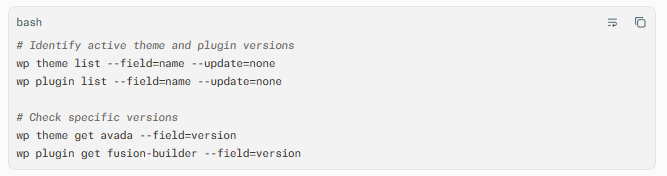
Administrators can also review the WordPress dashboard under Appearance > Themes and Plugins > Installed Plugins, then compare installed versions against Avada 7.16.1 and Fusion Builder 3.16.1.
Scanner signatures: Vulnerability scanners should test for Avada versions at or below 7.16 and Fusion Builder versions at or below 3.16, while confirming that both components are active. Scanners should avoid destructive proof-of-concept payloads in production and should verify patch levels before attempting exploitation.
Log indicators: Review web-server and WordPress logs for unexpected requests to Fusion Builder or Avada endpoints, unusual HTTP methods, unexpected file-upload or file-write activity, and requests containing suspicious filenames or PHP-related extensions. Investigate requests from unauthenticated users that precede the creation of unexpected files.
Behavioral anomalies: Look for newly created PHP files in upload directories, theme directories, or other writable locations; unexpected WordPress administrator accounts; modified theme or plugin files; unfamiliar scheduled tasks; outbound connections to unknown hosts; and unexplained changes to site content or redirects.
Network exploitation indicators: Monitor for external requests that chain multiple unusual actions in a short period, especially requests that reach privileged or administrative functionality without an authenticated session. A successful exploit may be followed by PHP file execution, command-and-control traffic, database queries, or lateral movement from the web server.
C — Mitigation & Remediation
- Immediate (0–24h): Update the vendor software. Update Avada to version 7.16.1 or later and Fusion Builder to version 3.16.1 or later. These releases contain ThemeFusion’s official fixes for CVE-2026-18431. If immediate patching is impossible, restrict public access to the WordPress administration area and vulnerable endpoints through a web application firewall, reverse proxy rule, or temporary maintenance mode. Preserve logs and create a verified backup before making changes.
- Short-term (1–7d): Hunt for compromise and validate the patch. Search for unexpected PHP files, modified core, theme, and plugin files, unknown administrator users, suspicious scheduled events, and unusual outbound traffic. Rotate WordPress administrator credentials, database credentials, API keys, and any secrets stored on or accessible from the web server. Re-scan the site after patching and confirm that Avada and Fusion Builder report the fixed versions.
- Long-term (ongoing): Strengthen WordPress security operations. Maintain a complete inventory of internet-facing websites, themes, plugins, and versions. Apply security updates through a tested patch-management process, enforce least privilege for WordPress users, deploy file-integrity monitoring, maintain offline or immutable backups, and include web applications in regular penetration testing. Ensure incident-response procedures cover WordPress compromise, credential rotation, forensic preservation, customer notification, and recovery.
Where patching cannot occur immediately, organizations should reduce exposure by limiting administrative access to trusted networks, disabling unused plugins and themes, enforcing strict file-upload controls, and using a web application firewall tuned to block known exploitation patterns. These are interim controls only; they do not replace the official vendor patch.
D — Best Practices
- Maintain an accurate, continuously updated inventory of all WordPress sites, themes, plugins, versions, and hosting environments.
- Patch internet-facing content management systems promptly, prioritizing vulnerabilities that permit unauthenticated code execution.
- Apply the principle of least privilege to WordPress accounts, plugins, service accounts, and server-level permissions.
- Deploy file-integrity monitoring and alerting for unexpected PHP files, theme modifications, and new administrator accounts.
- Test backups regularly and ensure at least one recovery copy is stored separately from the production environment.
- Include WordPress applications, plugins, and hosting configurations in recurring penetration tests and vulnerability-management reviews
Leave Comment