
CVE-2026-18072: Advanced Responsive Video Embedder Authentication Bypass - What It Means for Your Business and How to Respond
Introduction
CVE-2026-18072 affects a WordPress plugin used to embed video content from services such as YouTube, Vimeo, Rumble, Odysee, and Kick. The issue is serious because an attacker may gain complete administrative control of a website without first signing in.
If your organization uses WordPress for marketing, sales, customer service, publishing, or online transactions, a compromised site can affect more than web content. It can expose customer information, disrupt operations, damage trust, and create additional security problems across connected systems.
This article explains what the vulnerability means for your business, which organizations may be exposed, how the issue could affect different industries, and what steps you should take. A technical appendix provides verification and remediation guidance for security engineers, penetration testers, and information technology professionals.
S1: Background & History
CVE-2026-18072 was published on July 29, 2026, with Wordfence listed as the responsible CVE Numbering Authority and Wordfence PRISM credited with finding the issue. The affected product is the Advanced Responsive Video Embedder for Rumble, Odysee, YouTube, Vimeo, Kick … WordPress plugin, specifically version 10.8.7. The vulnerability received a CVSS 3.1 score of 9.8, rated Critical.
In plain language, the plugin release contained a hidden backdoor that bypassed normal login protections. The issue is classified as embedded malicious code, meaning harmful functionality was placed directly into otherwise legitimate software. Public reporting indicates that the malicious release was identified on July 28, 2026, and the WordPress plugin repository responded by restricting distribution. Later vulnerability tracking listed version 10.9.0 as a fixed version, although organizations should verify the release through trusted WordPress and vendor channels before deployment.
S2: What This Means for Your Business
If your website runs the affected plugin, an attacker may be able to take over an administrator account without knowing its password. That level of access can allow someone to change pages, publish fraudulent content, create or modify users, install additional components, redirect visitors, or place malicious code on the site.
The business impact depends on what the WordPress installation can access. A basic brochure site may suffer reputational damage and downtime. An ecommerce site may expose customer details, interfere with orders, or alter payment-related content. A membership, healthcare, education, or financial site may expose sensitive information and create notification, contractual, or regulatory obligations.
A compromised website can also become a launching point for attacks against employees and customers. Attackers may use trusted company branding to distribute phishing messages, steal credentials, or redirect visitors to malware. Search engines and security services may block the domain, reducing traffic and interrupting lead generation.
You should also treat the issue as a potential compromise, not merely a software update. A successful attacker could make additional changes that remain after the plugin is updated or removed. Account review, session invalidation, credential rotation, file integrity checks, and log analysis are therefore important parts of the response.
S3: Real-World Examples
Regional Bank: A regional bank uses WordPress for public financial education pages and customer announcements. An attacker who gains administrator access could replace legitimate pages with a convincing login form, collect customer credentials, and damage confidence even if core banking systems remain separate.
Online Retailer: A mid-sized online retailer uses the plugin on a product marketing site connected to analytics, customer forms, and promotional campaigns. An attacker could alter product links, insert malicious scripts, redirect shoppers, or use the site to send fraudulent order-related messages.
Healthcare Practice: A healthcare practice uses WordPress for appointment requests and patient education. Unauthorized administrative access could expose contact information, alter appointment instructions, publish misleading medical content, or create privacy and reporting concerns.
Small Professional Services Firm: A small accounting or legal firm may rely on a single WordPress site for its public presence and client inquiries. A compromise could result in website downtime, impersonation of the firm, malicious downloads, and loss of confidence among current and prospective clients.
S4: Am I Affected?
- You are potentially affected if your WordPress site has Advanced Responsive Video Embedder version 10.8.7 installed or installed at any time.
- You are potentially affected if your site reports plugin versions 10.8.7 or an unverified release in the 10.8.7 to 10.8.8 range.
- You should investigate immediately if the plugin is active, even if no suspicious administrator account is visible.
- You should review backups, deployment records, and hosting logs to determine whether version 10.8.7 was ever present.
- You should not assume that deactivating the plugin removes attacker access or reverses unauthorized changes.
- You should confirm that the installed release is a trusted fixed version, such as 10.9.0 or later, using official WordPress or vendor information.
- You should treat unexpected administrator logins, new sessions, changed files, unfamiliar plugins, or unusual outbound connections as possible compromise indicators.
Key Takeaways
- CVE-2026-18072 is a Critical WordPress plugin backdoor that can provide unauthenticated administrative access.
- You should investigate any site that installed Advanced Responsive Video Embedder version 10.8.7.
- A compromised site can affect operations, customer trust, data protection, regulatory obligations, and online revenue.
- Updating alone may not be sufficient because an attacker could have created persistence or changed other site components.
- You should combine trusted software replacement with account review, session invalidation, credential rotation, monitoring, and security testing.
Call to Action
Do not leave a critical WordPress backdoor to chance. IntegSec can help you determine whether your site was exposed, identify signs of compromise, validate remediation, and uncover related weaknesses through a focused penetration test. Visit IntegSec to reduce cybersecurity risk with practical, evidence-based testing.
Technical Appendix
A: Technical Analysis
CVE-2026-18072 affects the Advanced Responsive Video Embedder WordPress plugin version 10.8.7. The vulnerable functionality is associated with the plugin’s update-check code, including php/fn-update-check.php. A function registered on the WordPress init hook processes attacker-controlled _wplogin or _wpm parameters before normal authentication checks.
The code compares a supplied token with a hardcoded SHA-256 value embedded in the plugin source. Because the value functions as universal credentials, an unauthenticated remote attacker can target an existing administrator account and obtain full administrative control. The attack requires no privileges, no user interaction, and low complexity over the network.
The CVSS 3.1 vector is CVSS:3.1/AV:N/AC:L/PR:N/UI:N/S:U/C:H/I:H/A:H, with a score of 9.8. The recorded weakness is CWE-506, Embedded Malicious Code. The authoritative CVE record is available through the CVE Program and identifies Wordfence as the CNA.
B: Detection & Verification
Version enumeration commands:
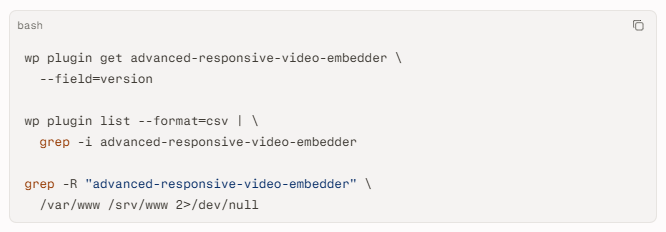
Scanner signatures and verification:
- Match the installed plugin slug and report version 10.8.7 as vulnerable.
- Use a WordPress-aware scanner or web application scanner with a signature for CVE-2026-18072.
- Treat version-only detection as exposure evidence, not proof that exploitation did or did not occur. Tenable notes that its check relies on the application’s reported version.
- Inspect the plugin files for the affected authentication logic and compare them with a known-good release.
Log and behavioral indicators:
- Review web access logs for requests containing
_wploginor_wpm. - Search authentication logs for administrator sessions that do not match normal geographic, time, device, or user-agent patterns.
- Look for new administrator sessions without corresponding normal login events.
- Check for unexpected plugins, must-use plugins, theme modifications, scheduled tasks, database changes, and outbound connections.
- Correlate web server, WordPress, hosting control panel, identity, and endpoint telemetry for activity after installation of version 10.8.7.
C: Mitigation & Remediation
- Immediate, 0–24 hours: Confirm whether version 10.8.7 was installed or active. Remove the affected plugin files rather than relying only on deactivation. Preserve relevant logs and a forensic copy before making extensive changes where incident-response requirements apply. Install a trusted fixed release, reported by WPScan as version 10.9.0 or later, after validating its provenance. patching or replacement cannot occur immediately, restrict access to the WordPress administrative interface through a virtual private network, approved corporate networks, or strong access-control rules. Add web application firewall rules to block requests containing the affected parameters, while recognizing that filtering is an interim control and not a substitute for removal. Place the site in maintenance mode if business operations permit.
- Short-term, 1–7 days: Reset all WordPress administrator passwords and rotate application credentials that may have been accessible from the site. Invalidate active sessions by rotating WordPress salts and secret keys in
wp-config.php. Review every administrator account, including dormant accounts, and remove unauthorized users, keys, tokens, and sessions. Run a file integrity scan and compare the site against a known-good backup. Inspect themes, plugins, uploads, database content, scheduled tasks, and hosting accounts for persistence. Review logs for exploitation and determine whether customer, employee, or regulated information may have been accessed. If compromise is suspected, involve qualified incident-response personnel before restoring from backup. - Long-term, ongoing: Maintain an approved WordPress component inventory, automated patch monitoring, and a documented emergency change process. Restrict administrator access with multifactor authentication, least privilege, separate accounts for administration, and network controls. Test backups through restoration exercises and continuously monitor administrator activity, file changes, and outbound traffic. Establish a repeatable third-party component review process that includes provenance checks, trusted repositories, version pinning, software composition analysis, and penetration testing. A backdoored plugin demonstrates why a clean version number alone cannot establish that a web application is safe.
D: Best Practices
- Maintain a complete inventory of WordPress plugins, versions, installation dates, and site owners.
- Restrict plugin installation and updates to approved administrators using multifactor authentication.
- Monitor authentication requests, administrator sessions, file changes, and unusual outbound connections.
- Treat unexpected embedded code or hardcoded credentials as a supply-chain risk requiring removal and investigation.
- Use a web application firewall and network access controls as defense-in-depth, not as replacements for vendor patches and verified cleanup
Leave Comment