
CVE-2026-15981: WordPress SAML Single Sign On Authentication Bypass - What It Means for Your Business and How to Respond
Introduction
CVE-2026-15981 is a critical authentication bypass in a widely used WordPress single sign-on plugin. If your organization uses WordPress as a customer portal, partner site, intranet, marketing site, or employee access point, an attacker may be able to sign in as an existing user without a password or valid identity-provider approval.
The issue is especially serious because it can grant access to a WordPress administrator account. From there, an attacker can alter website content, steal data, install malicious code, redirect customers, or use the site as a foothold into connected business systems.
This post explains what the vulnerability means for your business, who should treat it as urgent, and the practical steps to contain, patch, and verify the risk. A technical appendix provides detection and remediation guidance for security engineers, penetration testers, and IT teams.
Background & History
CVE-2026-15981 was published on July 23, 2026 and affects the SAML Single Sign On, SSO Login plugin for WordPress, associated with miniOrange and the developer identifier cyberlord92. All versions up to and including 5.4.4 of the affected free edition are vulnerable.
The flaw was reported through Wordfence, which assigned it a CVSS 3.1 base score of 9.8, placing it in the Critical severity range. In plain language, it is an authentication bypass: the plugin can mistakenly accept a malicious sign-in request as though it came from a trusted identity provider.
The issue stems from how the plugin checks a cryptographic signature. A signature check can return valid, invalid, or an error. The vulnerable code treated an error result as though it proved the request was legitimate, allowing a crafted sign-in response to bypass verification.
Later reporting indicated that the vulnerability was actively exploited and that related miniOrange SAML plugin editions required careful, edition-specific patching. The free edition fix arrived in version 5.4.5, while commercial editions use separate version lines and may require a manual update.securityaffairs+1
What This Means for Your Business
If your WordPress site uses the affected SAML plugin for single sign-on, assume that unauthorized access is possible until you confirm the plugin edition and version are patched. An attacker does not need a password, an employee account, or access to your identity provider to exploit the issue.
The most direct operational risk is administrator takeover. An attacker with WordPress administrator access can change pages, insert malicious scripts, redirect customers to fraudulent payment or login pages, disable security controls, or create persistent backdoor accounts. For a business that relies on its website for sales, lead generation, customer support, or partner access, even a short period of compromise can disrupt revenue and customer trust.
Data exposure is another major concern. Depending on what your WordPress environment stores or connects to, attackers may access customer records, form submissions, internal documents, credentials stored in plugins, or connections to other business applications. If the site handles regulated personal information, unauthorized access can create notification, investigation, and regulatory obligations in the United States and Canada.
Reputational harm can outlast the technical incident. Customers who see a compromised website, receive phishing messages that appear to come from your domain, or discover that their information was exposed may lose confidence in your organization. Search engines and security products may also flag an infected site, reducing visibility and increasing recovery costs.securityaffairs
Real-World Examples
Regional financial services firm: A regional bank uses WordPress for financial education content and customer support resources. An attacker gains administrator access through the vulnerable SAML plugin and injects a fraudulent login form. Customers enter credentials into the fake page, creating account-takeover and fraud-response costs beyond the initial website compromise.
Mid-sized healthcare organization: A clinic network operates a WordPress patient-resource portal connected to its identity provider. An attacker uses the bypass to obtain an administrator session and accesses form submissions containing patient contact details. The organization must investigate the access, notify affected individuals where required, and demonstrate that it contained the incident promptly.
E-commerce retailer: An online retailer uses WordPress for its blog and promotional landing pages. Attackers alter checkout links and inject malicious scripts that capture payment-related information. The business faces abandoned carts, chargebacks, customer complaints, and possible card-brand or payment-processor scrutiny.
Professional services firm: A small consulting company uses WordPress with SAML login for its internal knowledge base. An attacker creates a hidden administrator account and uses the site to send convincing phishing emails from the company domain. The incident damages client trust and diverts staff time from client work to incident response.securityaffairs
Am I Affected?
- You are running the SAML Single Sign On – SSO Login WordPress plugin, also known as the miniOrange SAML 2.0 Single Sign On plugin.
- Your free edition is version 5.4.4 or earlier; the free edition fix is version 5.4.5 or later.
- You use a commercial miniOrange SAML edition. These editions have independent version numbers, so a version above 5.4.5 does not by itself prove you are safe.securityaffairs
- Your WordPress site accepts SAML-based sign-in through the affected plugin, including employee, partner, customer, or administrator single sign-on.
- You cannot confirm the exact plugin edition, installed version, and vendor-provided patched release for that edition.
- Your logs show unexpected administrator sessions, unfamiliar administrator accounts, or SAML authentication requests from untrusted networks.securityaffairs
Key Takeaways
- CVE-2026-15981 is a critical authentication bypass that can allow an unauthenticated attacker to sign in as an existing WordPress user, including an administrator.
- Any organization using the affected SAML Single Sign On plugin should immediately identify its plugin edition and installed version.securityaffairs
- Version numbers alone can be misleading because free and paid miniOrange editions use separate version lines.securityaffairs
- A successful compromise can lead to website defacement, customer data exposure, malicious redirects, phishing, fraud, and regulatory consequences.
- Patching is necessary but not sufficient; organizations should also review administrator accounts, sessions, plugins, files, and authentication logs for signs of prior access.securityaffairs
Call to Action
If your organization operates WordPress sites, especially those using SAML single sign-on, do not wait for a suspicious login to confirm your exposure. IntegSec can assess your WordPress environment, validate whether the affected plugin and edition are present, test your authentication controls, and help prioritize remediation based on real business risk. Visit https://integsec.com to schedule a penetration test and strengthen your organization's security posture.
Technical Appendix
A — Technical Analysis
CVE-2026-15981 is an improper authentication flaw, classified as CWE-287, in the mo_saml_validate_signature() function of the SAML Single Sign On – SSO Login WordPress plugin. The vulnerable code performs a loose Boolean evaluation of the tri-state integer returned by PHP's openssl_verify().
openssl_verify() returns 1 for a valid signature, 0 for an invalid signature, and -1 when OpenSSL encounters a processing error. Because PHP evaluates -1 as truthy, the plugin treats an OpenSSL error as successful signature verification.
An unauthenticated remote attacker can submit a crafted SAMLResponse containing a chosen target user's NameID and a malformed signature value that causes an OpenSSL error. The plugin then bypasses signature verification, calls wp_set_auth_cookie() for the targeted account, and establishes an authenticated WordPress session, including for administrators.
The attack vector is network-based, exploit complexity is low, no privileges are required, and no user interaction is needed. The assigned CVSS 3.1 vector is CVSS:3.1/AV:N/AC:L/PR:N/UI:N/S:U/C:H/I:H/A:H, with a base score of 9.8. The authoritative record is available through NVD at https://nvd.nist.gov/vuln/detail/cve-2026-15981.
B — Detection & Verification
Version enumeration commands:
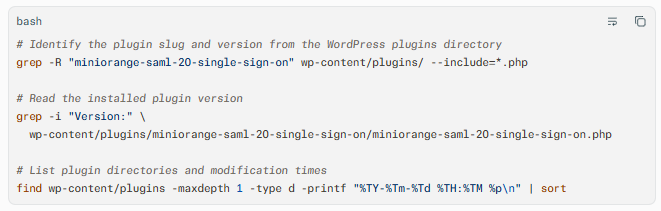
Scanner signatures: Configure vulnerability scanners to test for the miniorange-saml-20-single-sign-on plugin and distinguish the installed edition. Do not rely solely on a version greater than 5.4.5, because commercial editions use independent version ranges.securityaffairs
Log indicators: Review web-server, WordPress, and WAF logs for POST requests to SAML assertion-consumer endpoints containing SAMLResponse, followed by successful wp-login or /wp-admin sessions. Look for administrator sessions originating from unfamiliar IP addresses, countries, autonomous systems, or outside approved administrative networks.securityaffairs
Behavioral anomalies: Inspect for new administrator users, changed administrator email addresses, unexpected password resets, newly installed plugins, modified theme files, scheduled tasks, and unfamiliar JavaScript inserted into templates or database content.securityaffairs
Network exploitation indicators: Monitor for repeated unauthenticated SAML response submissions, malformed signature values, requests from known scanning infrastructure, and authenticated administrator activity from untrusted network ranges. Public reporting described opportunistic scanning of miniOrange SSO endpoints.securityaffairs
C — Mitigation & Remediation
- Immediate (0–24h): Identify every WordPress installation using the miniOrange SAML plugin and record the exact edition and version. Apply the official vendor patch for the specific edition as the primary remediation; for the free edition, update to 5.4.5 or later.
- Short-term (1–7d): If patching is not immediately possible, restrict access to WordPress administration and SAML endpoints to trusted networks, enforce multi-factor authentication where supported, and temporarily disable SAML login if the site can operate safely without it. Review administrator accounts, active sessions, plugins, themes, uploads, and scheduled jobs for indicators of compromise.securityaffairs
- Long-term (ongoing): Maintain an asset inventory that maps WordPress sites to plugins, editions, versions, owners, and identity-provider integrations. Require prompt patching of authentication components, monitor administrative access from approved networks, and include WordPress SSO configurations in periodic penetration tests and vulnerability-management reviews.securityaffairs
Interim mitigations: For commercial editions, do not assume the WordPress dashboard update prompt is reliable. Obtain the correct patched package directly from the vendor, verify its integrity, and perform a manual plugin update where required. Preserve logs and a filesystem backup before remediation so investigators can determine whether exploitation already occurred.securityaffairs+1
D — Best Practices
- Validate cryptographic results explicitly against every possible return value rather than relying on loose truthiness checks.
- Require strict signature verification, algorithm allowlists, and trusted identity-provider metadata for all SAML integrations.
- Restrict WordPress administrative interfaces and SAML endpoints to trusted networks or a zero-trust access solution.
- Maintain complete plugin inventory data, including edition-specific version numbers and vendor patch status.
- Test authentication bypasses, session handling, and administrative access controls through regular penetration testing
Leave Comment