
CVE-2026-15826: User Profile Builder Bug - What It Means for Your Business and How to Respond
Introduction
If your organization runs a WordPress website that uses the User Profile Builder plugin, a critical vulnerability tracked as CVE-2026-15826 deserves immediate attention. The flaw can allow an unauthenticated attacker to gain administrator-level access to a vulnerable site, potentially exposing customer information, altering content, installing malicious software, or disrupting business operations.
This risk is not limited to large enterprises. Any business in the United States or Canada that operates a WordPress site for marketing, customer portals, e-commerce, member services, or lead generation may be exposed if it uses an affected version of the plugin.
This post explains what the vulnerability means for your business, who should act, and how to respond. A technical appendix provides detection, verification, and remediation guidance for security engineers, penetration testers, and IT teams.
Background & History
CVE-2026-15826 affects the User Profile Builder plugin for WordPress, also known as Profile Builder, developed by Cozmoslabs. Versions up to and including 3.16.4 are affected, while version 3.16.5 contains the vendor fix.
The vulnerability was publicly disclosed on August 15, 2026, and was reported through Wordfence, which assigned it a critical CVSS 3.1 base score of 9.8. In plain language, it is an authentication bypass: a flaw in how the plugin handles a failed registration can allow an outsider to receive access intended for the site’s administrator account.
The timeline moved quickly. Wordfence received the report on July 14, validated it on July 15, and Cozmoslabs released version 3.16.5 on July 16, 2026. The public CVE record followed on August 15, giving defenders a clear patch target.iototsecnews+1
What This Means for Your Business
An attacker who gains WordPress administrator access can do far more than change a homepage. They may modify payment links, insert malicious code, redirect visitors, create hidden accounts, steal customer records, or disable the website entirely.
For a business, that can translate into lost revenue, customer support burdens, and disruption to marketing or sales operations. If the site handles personal information, financial details, health-related content, or member records, an administrator compromise may also trigger breach-notification, contractual, or regulatory obligations depending on the data involved and applicable laws.
Reputation is another major concern. Customers and partners may lose confidence if they learn that your website was used to distribute malware, harvest credentials, or expose their information. Recovery often costs more than prevention because it involves forensic investigation, cleanup, communication, and reassurance.
The practical message is straightforward: if you use User Profile Builder, treat this as a priority patch rather than a routine update. The vulnerability requires no valid user account and no interaction from a legitimate user, which makes exposed sites especially attractive targets.
Real-World Examples
Regional professional-services firm: A firm uses WordPress to publish thought leadership and capture consultation requests. An attacker gains administrator access, injects malicious redirects into high-traffic pages, and damages search visibility and client trust before the issue is detected.
Mid-sized e-commerce retailer: A retailer uses a WordPress-powered content site alongside its storefront. An attacker alters promotional links or injects code designed to capture visitor information, creating direct revenue loss and potential obligations to notify affected customers.
Community healthcare organization: A clinic uses a member portal for appointment information and educational resources. Unauthorized administrative access exposes patient-facing content and creates concern about whether personal information was accessed, requiring a careful investigation and external communication.
Small financial-services provider: A regional bank operates a WordPress site for financial education and lead capture. A compromise could allow attackers to modify contact details, insert fraudulent content, or misuse the brand in phishing campaigns, undermining customer confidence even if core banking systems remain unaffected.
Am I Affected?
- You are running the User Profile Builder plugin, also called Profile Builder, on a WordPress website.
- Your installed plugin version is 3.16.4 or earlier.
- Your site exposes a front-end registration form powered by User Profile Builder.
- The plugin’s “Automatically Log In after Registration” feature is enabled, which is central to the vulnerable login flow.
- Your WordPress site is publicly accessible on the internet.
- You have not yet confirmed an update to User Profile Builder version 3.16.5 or later.
- You cannot verify who holds administrator accounts or when administrative changes were last reviewed.
Key Takeaways
- CVE-2026-15826 affects User Profile Builder versions up to and including 3.16.4 and can enable unauthenticated administrator access.
- The vendor fixed the issue in version 3.16.5, so updating that plugin should be an immediate priority.
- A successful compromise can affect revenue, customer data, brand reputation, and regulatory or contractual obligations.
- Businesses should not assume that a small website is a low-value target; public-facing WordPress sites are commonly used as entry points for broader attacks.
- After patching, organizations should review administrator accounts, plugins, themes, files, and logs for signs of prior compromise.
Call to Action
If your organization uses WordPress, do not wait for suspicious activity to confirm risk. IntegSec can help you identify exposed plugins, validate whether this vulnerability is exploitable in your environment, and test your broader attack surface through professional penetration testing. Visit https://integsec.com to speak with our team and take a practical, business-focused step toward reducing cybersecurity risk.
Technical Appendix
A — Technical Analysis
CVE-2026-15826 is an unauthenticated authentication bypass caused by incorrect type conversion, classified as CWE-704, Incorrect Type Conversion or Cast. The affected component is the wppb_log_in_user() function in the Cozmoslabs User Profile Builder plugin, versions through 3.16.4.
The plugin calls absint() on the value returned by wp_insert_user() before checking whether that value is a WP_Error object. When a registration request includes a username of 61 to 70 characters, WordPress core rejects it and returns a WP_Error. The plugin’s premature absint() call coerces that error object to integer 1, causing the plugin to associate the auto-login flow with user ID 1.
If user ID 1 is an administrator, the attacker can obtain a transient-backed auto-login nonce and authenticate as that administrator. The attack vector is network-based, requires low attack complexity, no privileges, and no user interaction. The CNA-assigned CVSS 3.1 vector is CVSS:3.1/AV:N/AC:L/PR:N/UI:N/S:U/C:H/I:H/A:H, with a base score of 9.8. The authoritative NVD record is available at https://nvd.nist.gov/vuln/detail/CVE-2026-15826.
B — Detection & Verification
Version enumeration commands:
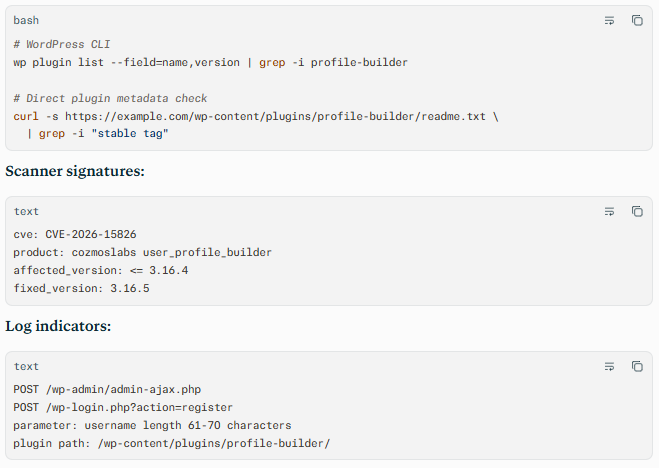
Behavioral anomalies:
- Administrator logins immediately following failed registration attempts.
- New administrator users, unexpected plugin installations, or modified theme files.
- Outbound connections from the web server to unfamiliar command-and-control or file-hosting domains.
- Changes to core files, database options, scheduled tasks, or redirect rules.
- Auto-login nonce activity tied to user ID 1 without a corresponding successful registration.
Network exploitation indicators:
- Requests to registration endpoints containing unusually long
usernamevalues. - Repeated requests to User Profile Builder endpoints from a single source address.
- Successful
POSTrequests followed by authentication activity for the administrator account. - Traffic to known exploit proof-of-concept repositories or scanning infrastructure.
C — Mitigation & Remediation
- Immediate (0–24h): Update User Profile Builder to version 3.16.5 or later, which is the official vendor fix. If immediate patching is not possible, disable the plugin’s “Automatically Log In after Registration” setting and restrict public access to registration endpoints through a web application firewall or access-control rule.
- Short-term (1–7d): Review all administrator accounts, remove unrecognized users, rotate administrator credentials and application secrets, and inspect recently modified plugins, themes, uploads, and database options. Search web-server, WordPress, and authentication logs for failed registrations with 61 to 70 character usernames and unexpected administrator sessions. Preserve evidence before cleanup if compromise is suspected.
- Long-term (ongoing): Establish a plugin inventory and patch-management process with defined update windows for internet-facing WordPress assets. Use least-privilege administrator accounts, multifactor authentication, file-integrity monitoring, centralized logging, and periodic penetration testing to validate that WordPress plugins and registration workflows do not reintroduce authentication or authorization weaknesses.
D — Best Practices
- Maintain an accurate inventory of WordPress plugins, versions, and exposed registration or login endpoints.
- Apply vendor security updates promptly, prioritizing internet-facing components and authentication-related fixes.
- Disable automatic login after registration unless the business requirement is documented and the workflow has been security-tested.
- Limit the number of administrator accounts and enforce multifactor authentication for all privileged users.
- Monitor registration failures, authentication events, file changes, and plugin updates for anomalies.
- Include WordPress plugin logic and custom registration flows in regular penetration tests, especially where errors, object types, or user identifiers influence authentication decisions.
Leave Comment