
CVE-2026-15372: WP 2FA Authentication Bypass - What It Means for Your Business and How to Respond
Introduction
CVE-2026-15372 is a high-severity security vulnerability affecting the WP 2FA plugin for WordPress. If your organization uses this plugin to protect website accounts with two-factor authentication, the vulnerability can undermine that added protection. An attacker who already has a user’s password may be able to sign in without completing the required second verification step, including when targeting administrator accounts.
This matters because WordPress often supports business-critical functions: public websites, ecommerce stores, customer portals, content operations, campaign landing pages, and integrations with analytics or marketing platforms. A compromised administrator account can give an intruder broad control over the site and its content.
This article explains the business impact, how to determine whether you may be affected, and how to respond. The technical appendix provides implementation, detection, and remediation guidance for your security and IT teams.
Background & History
CVE-2026-15372 was published by the National Vulnerability Database on August 5, 2026. It affects versions of the WP 2FA WordPress plugin earlier than version 4.1.0. The vulnerability was sourced through WPScan and is categorized as improper authentication, meaning the software does not reliably enforce an authentication requirement that users and administrators expect it to enforce.
In plain terms, WP 2FA can fail to validate the second authentication factor during certain login flows involving supported authentication methods. As a result, an attacker who has already obtained a legitimate password could bypass the second factor and access the relevant WordPress account.
CISA’s Authorized Data Publisher assessment assigns a CVSS version 3.1 score of 7.5 out of 10, rated High. The National Vulnerability Database has not supplied its own enrichment assessment, but it lists the CISA-provided score, vector, affected product range, and CWE-287 classification. The record was last modified on August 26, 2026.
What This Means for Your Business
Two-factor authentication is designed to reduce the harm caused by stolen, reused, guessed, or phishing-captured passwords. CVE-2026-15372 can remove that safeguard for organizations using vulnerable WP 2FA versions. The flaw does not mean every WordPress site will be breached, and an attacker still needs a valid password. However, password exposure is common enough through phishing, credential reuse, third-party breaches, malware, or weak account practices that the second factor is often the control preventing an account takeover.
If an attacker accesses a standard WordPress account, they may be able to publish unauthorized content, access private drafts, alter profile information, or use the account as a foothold for further activity. If the compromised account has administrator privileges, the consequences can be much broader. You could face website defacement, malicious redirects, fraudulent customer communications, exposure of information stored in the WordPress environment, or installation of unauthorized plugins and code.
The business effects can include interrupted web operations, lost ecommerce revenue, recovery costs, diminished customer confidence, and reputational harm. Organizations subject to contractual security requirements or privacy obligations in the United States or Canada may also need to assess whether an intrusion exposed regulated or personal information. Your response should therefore involve both website owners and the teams responsible for identity, security, legal, privacy, and incident response.
Real-World Examples
A regional bank: A regional bank uses WordPress for investor communications, branch information, and public educational content. An attacker obtains the password of a site administrator through a phishing campaign and bypasses the expected second-factor check. The attacker changes public pages or adds a fraudulent link, creating customer trust, brand, and regulatory-response issues even if core banking systems remain separate.
A mid-sized ecommerce retailer: An online retailer relies on WordPress for product content and marketing campaigns. A compromised marketing administrator account could allow an attacker to insert malicious scripts, redirect visitors to a fraudulent checkout page, or change promotion details. The business may then face abandoned carts, advertising waste, customer-support volume, and potential payment-security investigation costs.
A healthcare services provider: A multi-location healthcare provider uses WordPress for appointment information, patient education, and contact forms. An attacker gains access to a privileged site account and alters contact pathways or publishes misleading notices. Even without direct access to clinical systems, the disruption could affect patient communications and require a careful review of whether website form submissions or connected systems were exposed.
A Canadian professional-services firm: A growing professional-services business uses WordPress to host thought leadership, job postings, and lead-generation forms. A compromised editor account enables the publication of fake hiring notices or client-targeted phishing content. The organization must spend time removing malicious material, notifying affected stakeholders, and restoring confidence in its digital presence.
Am I Affected?
- You are likely affected if you run the WP 2FA plugin on any WordPress website and the installed version is earlier than 4.1.0.
- You are likely affected if WP 2FA is used to enforce two-factor authentication for administrators, editors, ecommerce managers, support staff, or other privileged accounts.
- You may be affected if a third-party web agency, managed host, marketing team, or ecommerce provider administers your WordPress environment and you do not have a current plugin inventory.
- You should investigate if your team assumes two-factor authentication protects WordPress accounts but has not tested whether the login flow actually requires a valid second factor.
- You are not affected by this specific CVE if you do not use WP 2FA, or if all WordPress instances using WP 2FA have been verified as version 4.1.0 or later.
- You should still review account activity if vulnerable versions were previously installed, because patching resolves the software defect but does not undo unauthorized access that may already have occurred.
Key Takeaways
- CVE-2026-15372 affects WP 2FA versions earlier than 4.1.0 and can allow a person with a valid password to bypass two-factor authentication.
- The highest business risk is unauthorized access to WordPress administrator accounts, which can lead to site changes, malicious content, and loss of customer trust.
- Your organization should identify every WordPress site using WP 2FA and update vulnerable installations as a priority.
- You should review administrator accounts, login activity, recently changed plugins, site files, and public content for signs of unauthorized activity.
- A patch is essential, but your broader response should also strengthen password security, privileged-account controls, monitoring, and testing.
Call to Action
Your public website is part of your business operations, customer experience, and brand. IntegSec helps organizations identify the security gaps that routine updates and compliance checklists can miss. Our penetration testing services assess your real-world exposure across web applications, authentication controls, configurations, and attack paths, then provide actionable remediation guidance for your team.
Move from assumption to evidence. Contact IntegSec to discuss a penetration test and a deeper, risk-based approach to reducing your cybersecurity exposure.
Technical Appendix
A — Technical Analysis
CVE-2026-15372 is an improper-authentication vulnerability, classified as CWE-287, in the WP 2FA WordPress plugin before version 4.1.0. The vulnerable behavior occurs during login when a supported second-factor authentication method is selected. The plugin fails to validate the second factor correctly, allowing a user who has supplied a valid account password to proceed without satisfying the intended additional authentication control.
The vulnerability affects an authentication boundary rather than WordPress core. Its practical impact depends on the privileges associated with the compromised account. Administrator accounts are particularly consequential because they can commonly modify themes, plugins, users, site settings, and published content.
CISA’s Authorized Data Publisher assessment scores the issue 7.5 High using the vector CVSS:3.1/AV:N/AC:L/PR:N/UI:N/S:U/C:H/I:N/A:N. This indicates network reachability, low attack complexity, no prerequisite platform privileges, no user interaction, unchanged scope, high confidentiality impact, and no assigned integrity or availability impact in the CVSS assessment. NVD lists the same vector and identifies WPScan as the source for affected-product information.
B — Detection & Verification
Verify the installed plugin version through the WordPress administrative interface, command-line tooling, deployment manifests, or file metadata. Any installed version below 4.1.0 requires remediation.
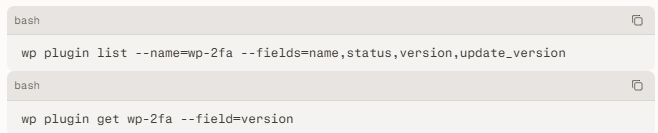
Version enumeration: Security teams should inventory all WordPress installations, including production, staging, regional, campaign, and legacy sites. Check centralized configuration-management records where available, but validate live systems because unmanaged plugin updates are common.
Scanner signatures: Vulnerability scanners should identify the wp-2fa plugin and flag semantic versions less than 4.1.0. Detection logic should account for disabled plugins that remain installed, because they can be re-enabled or reflect weak operational hygiene.
Log indicators: Review WordPress, web server, web application firewall, identity-provider, and hosting logs for successful logins where a password was accepted but expected second-factor events are absent. Correlate user, source address, timestamp, browser characteristics, and privilege level.
Behavioral anomalies: Investigate administrator logins from unfamiliar locations, unexpected account changes, new administrator users, modified plugins or themes, unexplained redirects, altered scheduled tasks, and recently changed site content.
C — Mitigation & Remediation
- Immediate (0–24h): Update WP 2FA to version 4.1.0 or later through approved change-management procedures. Confirm the update completed on every WordPress instance, not just the primary production site. If patching cannot occur immediately, disable the WP 2FA plugin only after evaluating how to maintain secure authentication through an alternate, tested control. A nonfunctioning two-factor implementation should not be treated as a compensating safeguard.
- Immediate (0–24h): Reset passwords for WordPress administrators and other privileged users if vulnerable versions were active, especially where password reuse, suspicious authentication activity, or unverified login histories exist. Revoke active sessions and application passwords where your environment supports those actions. Review recently created users, plugin changes, theme changes, file modifications, and outbound links.
- Short-term (1–7d): Test the complete authentication flow after upgrading. Confirm that each enabled second-factor method rejects access when the factor is missing, invalid, expired, or associated with the wrong account. Test both privileged and nonprivileged roles in a controlled environment before relying on the implementation as a security control.
- Short-term (1–7d): Review WordPress administrative exposure. Restrict administrator access by network location where practical, reduce the number of privileged accounts, remove dormant users, require unique passwords, and ensure administrators use a separate privileged account rather than a daily-use account.
- Long-term (ongoing): Establish continuous plugin inventory, vulnerability monitoring, patch governance, and periodic web application testing. Include authentication bypass testing in penetration tests and validate that security controls work across alternate login methods, plugins, and integration paths.
D — Best Practices
- Maintain a complete inventory of WordPress plugins, versions, owners, business purpose, and patch status across production and nonproduction environments.
- Apply vendor security updates promptly after testing, with defined emergency-change procedures for high-severity authentication flaws.
- Require unique, phishing-resistant authentication methods for privileged accounts where supported, rather than relying solely on passwords and unverified plugin behavior.
- Limit WordPress administrator privileges to personnel who need them, and promptly remove access for former employees, contractors, and inactive accounts.
- Monitor authentication events and administrative changes so your team can detect successful logins that do not follow the expected two-factor authentication sequence
Leave Comment