
CVE-2026-13133: LINE for Windows DLL Search Path Hijacking - What It Means for Your Business and How to Respond
Introduction
CVE-2026-13133 is a high-severity vulnerability affecting the installer for LINE for Windows, a messaging and collaboration application that may be present on employee endpoints, particularly in organizations with international customers, partners, distributed teams, or bring-your-own-device practices. The issue can allow malicious code to run when an employee launches an older LINE installer from a folder containing a specially placed malicious file.
For your business, this is primarily an endpoint and software-management risk. It does not mean every installed LINE client is actively compromised, nor is it a remote, internet-facing attack by itself. However, it creates an opportunity for malware delivery when users download, share, store, or execute outdated installation packages in uncontrolled folders such as Downloads, desktop locations, shared drives, or removable media.
This post explains the business implications, practical exposure checks, response priorities, and technical verification guidance for security and IT teams. The affected installer is LINE for Windows versions earlier than 26.4.0.line.github
Background & History
CVE-2026-13133 was published on August 10, 2026 and concerns LineInst.exe, the installer used for LINE for Windows. LY Corporation reported that versions before 26.4.0 can load a Windows library file named Msftedit.dll from the installer’s own directory instead of ensuring that Windows uses the legitimate copy located in the protected System32 directory. This creates a search-path weakness commonly called DLL hijacking.
In plain language, if an attacker can get a harmful file placed beside an older installer, and a user runs that installer, Windows may load the harmful file first. The attacker’s code would then run under the permissions of the employee who launched the installer.
LY Corporation assigned the issue a CVSS version 4 score of 8.4 out of 10, categorized as high severity. The vendor’s published remediation is to update LINE to the latest version, with version 26.4.0 identified as the fixed release. NVD published the record on August 10 and last modified it on August 28, 2026.
What This Means for Your Business
You should treat this vulnerability as a software supply-chain and endpoint-control concern. An attacker needs local access or a way to persuade an employee to download, unpack, or open files in the same folder as an older LINE installer. That prerequisite limits broad remote exploitation, but it aligns with common attack patterns such as phishing, malicious file sharing, compromised shared folders, and unsafe use of removable storage.
The immediate business impact can include unauthorized software execution on an employee device. Depending on the employee’s access, that could expose business communications, browser sessions, locally stored documents, saved credentials, or data reachable through network shares. If the employee has elevated administrative access, the operational consequences can be more serious.
For organizations subject to privacy, financial-services, health-care, contractual, or cross-border data obligations in the United States and Canada, an endpoint compromise can also trigger investigation, documentation, notification, and legal review requirements. Even when no sensitive information is confirmed exposed, incident response consumes IT time and can disrupt employees who depend on their computers for customer support, sales, finance, operations, or remote collaboration.
Your strongest response is straightforward: remove or update older installers, prevent users from running installers in uncontrolled directories, and verify that endpoint controls limit executable and library loading from user-writable locations.
Real-World Examples
Regional bank: A regional bank permits a small communications team to use LINE to coordinate with overseas customers. An employee keeps an outdated LINE installer and several downloaded attachments in the same Downloads folder. If a malicious attachment places a harmful library beside the installer and the employee runs the installer, malicious code could execute in the employee’s Windows session, potentially leading to investigation of accessible customer and internal records.
Canadian logistics provider: A logistics provider uses shared folders to exchange shipping documents with external partners. An older LINE installer copied to a shared location can become a delivery point if an attacker adds a malicious library file to the same directory. The resulting endpoint incident could delay dispatch work, disrupt communications, and require device containment during a time-sensitive operational window.
Mid-sized professional-services firm: A consulting firm allows employees to install approved collaboration tools but lacks a formal software deployment process. A consultant may download an older installer while traveling and execute it from a cluttered desktop folder. A successful attack could expose project documents, client communications, and stored browser authentication sessions, damaging client trust even if the intrusion is limited to one device.
North American retail organization: A retailer uses centrally managed Windows devices but has exceptions for a few marketing and customer-engagement staff. A legacy installer discovered on one of those endpoints indicates a gap in asset inventory and application control. The business risk is not only the vulnerable installer itself, but the broader possibility that unapproved or outdated software is present outside normal patching workflows.
Am I Affected?
- You are affected if any employee device has LINE for Windows installed or staged for installation at a version earlier than 26.4.0.line.github
- You are affected if older copies of
LineInst.exeexist in Downloads, desktop folders, shared drives, file-transfer locations, software repositories, or removable media. - You are at increased risk if users can install software without IT review or run installers from folders where downloaded files can be added or modified.
- You are at increased risk if endpoint security policies allow dynamic-link libraries, which are supporting Windows program files, to load from user-writable directories without restriction.
- You are likely not affected by this specific CVE if LINE for Windows is not used or stored anywhere in your environment.
- You should still verify your environment if employees use unmanaged or personally owned Windows devices for business communications.
Key Takeaways
- CVE-2026-13133 affects LINE for Windows installers before version 26.4.0 and has a vendor-assigned high-severity CVSS version 4 score of 8.4.line.github
- The weakness can cause a malicious file beside an older installer to run when an employee launches that installer.
- Exploitation requires user interaction, but common business conditions such as downloaded files and shared folders can create that opportunity.
- Updating LINE, removing old installer copies, and enforcing endpoint controls are the highest-priority actions.
- This issue is an opportunity to validate your broader software inventory, patching, and application-control practices.
Call to Action
IntegSec helps organizations identify the endpoint, application, and operational weaknesses that turn individual vulnerabilities into business risk. Our penetration testing and cybersecurity risk-reduction services evaluate whether outdated software, permissive user workflows, unmanaged endpoints, and insufficient controls can be chained into meaningful compromise. Contact IntegSec to assess your exposure, validate remediation, and build a more resilient security posture without disrupting your business operations.
Technical Appendix
A — Technical Analysis
CVE-2026-13133 is an uncontrolled search path element vulnerability, classified as CWE-427. The affected component is LineInst.exe, the LINE for Windows installer in releases before 26.4.0. During execution, the installer loads Msftedit.dll through a relative path without establishing a secure DLL search path. Consequently, a malicious Msftedit.dll placed in the installer directory can be selected before the legitimate Windows System32 copy.
The attack vector is local. Attack complexity is low, no attacker privileges are required, and user interaction is required because a victim must execute the vulnerable installer. Successful exploitation causes arbitrary code execution in the context of the user launching LineInst.exe; impact therefore depends on that user’s Windows privileges and accessible resources.
LY Corporation assigned CVSS 4.0 vector CVSS:4.0/AV:L/AC:L/AT:N/PR:N/UI:A/VC:H/VI:H/VA:H/SC:N/SI:N/SA:N, with a base score of 8.4. The NVD record references the vendor advisory and identifies CWE-427, although NVD had not published its own CVSS assessment at the time of record retrieval.
B — Detection & Verification
Version enumeration: Security teams can check installed LINE versions with PowerShell:
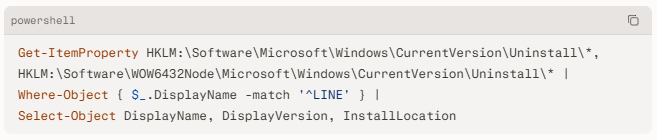
The vulnerable condition applies to LINE for Windows versions before 26.4.0. Teams should also search endpoints and shared locations for legacy LineInst.exe copies, especially in user profiles and software-distribution shares.line.github
File discovery: A basic endpoint search can identify installer files and suspicious co-located DLLs:

Behavioral indicators: Detection engineering should investigate LineInst.exe processes that load Msftedit.dll from a user-writable folder rather than C:\Windows\System32. Useful telemetry includes process creation for LineInst.exe, image-load events showing a non-System32 Msftedit.dll, unsigned DLL loads, and child-process activity that is atypical for an installer.
Network indicators: The vulnerability itself does not require network access. Any post-exploitation network connections, credential access behavior, persistence creation, or lateral movement should be investigated as potentially separate malicious activity.
C — Mitigation & Remediation
- Immediate (0–24h): Update LINE for Windows to version 26.4.0 or later using the official vendor distribution process. Identify and remove older
LineInst.exepackages from endpoints, Downloads folders, desktop locations, shared drives, software repositories, and removable-media workflows. The vendor’s published fix is to update LINE to the latest version. - Immediate (0–24h): If patching cannot occur immediately, prevent execution of legacy installers from user-writable paths. Move any required installer into a newly created, empty, access-controlled directory before execution, then validate that no untrusted files are present beside it. This is an interim containment measure, not a replacement for patching.
- Short-term (1–7d): Use endpoint management tools to inventory installed LINE versions and locate legacy installer artifacts. Apply application-control policies through Windows Defender Application Control or AppLocker to restrict untrusted executable and DLL activity from Downloads, temporary folders, user profile locations, and other user-writable paths. Test policies before broad deployment to avoid disrupting legitimate business applications.
- Short-term (1–7d): Configure endpoint detection and response tooling to alert on
LineInst.exeloadingMsftedit.dllfrom outsideC:\Windows\System32. Review historical telemetry where available for prior executions of the installer from user-writable locations and suspicious DLL load paths. Investigate any discovered malicious or unsigned DLLs as possible endpoint compromise. - Long-term (ongoing): Strengthen software lifecycle controls. Centralize approved software acquisition, deploy applications through managed tooling, restrict local administrator rights, maintain a software asset inventory, and regularly scan for unsupported or outdated installers. Conduct phishing and safe-download awareness training that specifically addresses installers, archives, shared folders, and removable media.
D — Best Practices
- Maintain a complete inventory of installed software and installer packages, not just applications currently registered in the operating system.
- Deploy approved software through managed tools so employees do not need to run installers from Downloads folders, desktops, or shared drives.
- Enforce application-control policies that limit DLL and executable loading from user-writable paths.
- Restrict local administrative privileges and separate standard user work from privileged IT administration.
- Monitor process and image-load telemetry for DLLs loaded from unexpected paths, especially when installers execute from user profile directories
Leave Comment