
CVE-2026-11613: Divi Ajax Filter Bug - What It Means for Your Business and How to Respond
Introduction
If your organization operates a WordPress website, a single vulnerable plugin can expose customer records, business systems, and your public reputation to attackers. CVE-2026-11613 affects the widely used Divi Ajax Filter plugin and carries a critical severity rating because it may be exploited without credentials.
This issue matters to any business in the United States or Canada that uses WordPress for marketing, e-commerce, lead generation, client portals, or content delivery. Even organizations that do not manage their own websites may be affected through agencies, hosting providers, or third-party developers.
This post explains what the vulnerability is, who is at risk, the business consequences of exploitation, and the practical steps to determine exposure and respond. A technical appendix provides detection, verification, and remediation guidance for security engineers, penetration testers, and IT teams.
Background & History
CVE-2026-11613 was published on September 4, 2026 and concerns the Divi Ajax Filter plugin for WordPress, developed by Divi Engine. All plugin versions through 5.1.2 are affected.
The vulnerability is a local file inclusion flaw in the plugin’s custom_loop_template parameter. In plain language, the plugin accepts a file path from a web request and uses it to load a PHP template. Because that input is not sufficiently restricted, an unauthenticated attacker can direct the site to include and execute a PHP file already present on the server.
Wordfence, the CVE numbering authority for this issue, assigned a CVSS 3.1 base score of 9.8 out of 10, classifying it as Critical. The vendor addressed the issue in Divi Ajax Filter version 5.1.3, released on August 11, 2026, by restricting custom loop templates to the child theme templates folder and blocking unsafe file paths.
The public disclosure followed the availability of a vendor fix, but the delayed CVE publication created a window in which organizations may have remained unaware of the risk. The vulnerability is exploitable only when a site’s loop_templates setting is configured as custom-template.
What This Means for Your Business
For a business, this is not simply a website bug. It is a potential entry point into the systems that support revenue, customer service, and day-to-day operations.
An attacker who successfully exploits the flaw may be able to execute PHP code on the web server. Depending on the site’s configuration, that can lead to stolen customer or payment-related data, manipulated website content, installation of malware, or use of the server to attack other systems. The vulnerability can also allow attackers to bypass access controls and obtain sensitive information.
The operational impact can be immediate. A compromised WordPress site may be taken offline, defaced, injected with malicious redirects, or used to send spam. For e-commerce businesses, that can interrupt sales during peak periods. For professional services firms, it can undermine client trust and create notification obligations if personal information is exposed.
Compliance exposure is equally important. Organizations subject to state, provincial, or sector-specific privacy requirements may need to investigate whether personal information was accessed, notify affected individuals, and document the incident. A preventable plugin vulnerability can also create difficult conversations with customers, partners, insurers, and regulators.
The central business question is not whether the plugin is popular. It is whether your website exposes an exploitable configuration and whether you can prove that it was patched, monitored, and reviewed after disclosure.
Real-World Examples
Regional e-commerce retailer: A mid-sized online retailer uses Divi Ajax Filter to help shoppers narrow product listings. If attackers exploit the flaw, they could alter product pages, inject payment-related redirects, or access order and customer data stored on the site, resulting in lost sales and potential notification costs.
Professional services firm: A regional accounting or legal firm uses WordPress for thought leadership and client intake forms. Compromise could expose inquiry details, redirect visitors to fraudulent pages, or damage the firm’s credibility with clients who expect confidential handling of sensitive matters.
Healthcare marketing site: A multi-location healthcare provider uses WordPress to publish service information and appointment requests. Even if clinical systems are separate, a compromised public site can expose patient inquiry data, disrupt appointment scheduling, and trigger regulatory and reputational consequences.
SaaS company: A growing software company uses WordPress for its main website and documentation. An attacker could modify download links, insert malicious scripts, or pivot from the web server toward internal administrative systems, putting both customers and internal operations at risk.
Am I Affected?
- You are running the Divi Ajax Filter plugin for WordPress.
- Your installed plugin version is 5.1.2 or earlier.
- Your site uses a custom loop template configuration.
- The
loop_templatessetting is set tocustom-template. - Your WordPress site allows PHP files to be uploaded or stored in locations that could be included by the plugin.
- You cannot confirm that the plugin has been updated to version 5.1.3 or later.
- You use an agency, managed hosting provider, or third-party developer and have not verified their plugin inventory and patch status.
- You have WordPress sites in staging, development, or legacy environments that are internet-facing or reachable from internal networks.
If any of these statements applies, treat the site as potentially exposed until you have verified the plugin version, configuration, and available logs.
Key Takeaways
- CVE-2026-11613 is a critical vulnerability in Divi Ajax Filter versions 5.1.2 and earlier.
- An unauthenticated attacker may be able to include and execute PHP files already on the server.
- Exploitation can lead to data theft, website manipulation, malware deployment, and broader system compromise.
- The risk is concentrated in sites using the custom loop template configuration.
- Divi Engine fixed the issue in version 5.1.3, so prompt patching and post-incident review are essential.
Call to Action
If you operate WordPress sites for your business, do not wait for a security alert to confirm your exposure. IntegSec can assess your plugin inventory, test your public-facing applications, validate whether this vulnerability was exploited, and help you build a practical risk-reduction program. Visit https://integsec.com to schedule a penetration test and speak with our team.
Technical Appendix
A — Technical Analysis
CVE-2026-11613 is an improper control of filename for include/require statement in a PHP program, tracked as CWE-98. The affected component is the Divi Ajax Filter plugin’s handling of the custom_loop_template parameter.
The plugin accepts a template value through an HTTP request and uses it in a PHP include operation. Insufficient path validation allows an unauthenticated remote attacker to supply a path to an arbitrary .php file on the server. If the attacker can place or upload a PHP file in an includable location, the included file’s code executes with the privileges of the web application.
The attack vector is network-based, with low attack complexity, no required privileges, and no user interaction. The CVSS 3.1 vector is CVSS:3.1/AV:N/AC:L/PR:N/UI:N/S:U/C:H/I:H/A:H, producing a base score of 9.8. Exploitation requires loop_templates to be set to custom-template.
The NVD record is available at https://nvd.nist.gov/vuln/detail/CVE-2026-11613. NVD lists Wordfence as the CNA and assigns CWE-98; NVD has not provided its own enriched CVSS assessment.
B — Detection & Verification
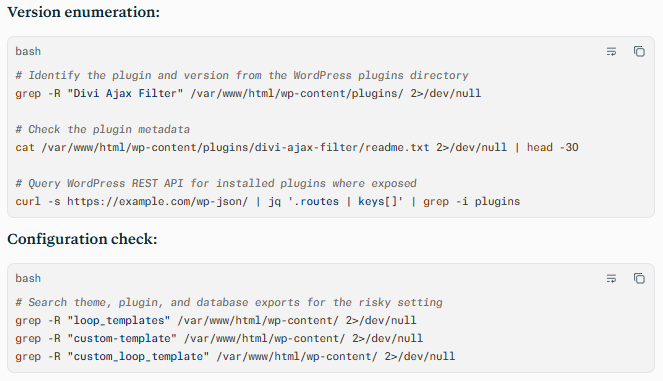
Scanner signatures: Vulnerability scanners should flag Divi Ajax Filter versions at or below 5.1.2 and identify the custom_loop_template parameter as an unauthenticated local file inclusion vector. Validate scanner findings manually before remediation decisions.
Log indicators:
- HTTP requests containing
custom_loop_templatewith unexpected path values. - Requests containing traversal sequences such as
../, absolute paths, or references to uploaded PHP files. - Requests to AJAX endpoints where
loop_templatesequalscustom-template. - PHP warnings or errors referencing unexpected include paths.
- New or unexpected
.phpfiles in upload directories, temporary directories, or writable theme folders.
Behavioral anomalies: Review for unexplained administrator accounts, modified theme or plugin files, outbound connections from the web server, new cron events, unexpected database changes, and web shell activity. Treat any confirmed exploitation as a full incident response event rather than a patch-only remediation.
C — Mitigation & Remediation
- Immediate (0–24h): Update Divi Ajax Filter to version 5.1.3 or later from the official vendor distribution. If updating is not immediately possible, disable the plugin or remove public access to affected pages. Restrict access to WordPress administrative endpoints, disable unsafe file upload functionality, and preserve logs for investigation.
- Short-term (1–7d): Audit all WordPress environments, including staging and legacy sites, for Divi Ajax Filter and bundled copies distributed through related Divi Engine products. Review web access logs, PHP error logs, upload directories, theme files, database users, scheduled tasks, and administrator accounts for indicators of compromise. Rotate credentials for WordPress administrators, database users, API keys, and deployment accounts where compromise is suspected.
- Long-term (ongoing): Establish a plugin inventory and patch-management process with defined SLAs for critical vulnerabilities. Limit plugin installation to approved sources, remove unused plugins, enforce least privilege for WordPress roles, restrict executable file uploads, deploy a web application firewall as a compensating control, and include WordPress plugin testing in routine penetration tests.
Official vendor patching is the primary remediation. The vendor changelog confirms that version 5.1.3 restricts custom loop templates to the child theme templates folder and blocks unsafe file paths.
For environments that cannot patch immediately, use layered interim controls: disable the plugin, block requests containing suspicious custom_loop_template values at the web application firewall, prevent PHP execution in upload directories, restrict outbound traffic from the web server, and increase logging and alerting on WordPress endpoints.
D — Best Practices
- Maintain a complete inventory of WordPress core, themes, and plugins across production, staging, and legacy environments.
- Patch critical plugin vulnerabilities promptly, prioritizing internet-facing systems and unauthenticated attack paths.
- Restrict file uploads, prevent PHP execution in upload directories, and validate all user-controlled file paths.
- Apply least privilege to WordPress users, service accounts, databases, and deployment pipelines.
- Test WordPress applications regularly with authenticated and unauthenticated penetration testing to identify plugin and configuration weaknesses before attackers do
Leave Comment